Staying fit as a busy professional in 2026 is less about finding time for the gym and more about using the right tools to make every spare minute count. The latest workout apps are built with executives and high performers in mind: they offer short, efficient sessions, intelligent programming, and clear guidance you can follow between meetings, on business trips, or at home with minimal equipment.
Many of the best workout apps include features like adaptive plans, calendar integration, and progress dashboards, so your training can be as data-driven and streamlined as the rest of your work life. If your goal is to manage stress, build strength, or simply close your activity ring, the best workout apps of the year are designed to remove friction, reduce decision fatigue, and help you stay consistent.
Best Workout Apps of 2026
- Best Workout App Overall: BetterMe
- Best Workout App for Muscle Gain: SHRED
- Best Workout App for Weight Loss: Reverse Health
- Best Free Workout App: WalkFit
- Best Workout App for Beginners: Muscle Booster
Best Workout Apps Comparison Table
Best Workout App Overall: BetterMe
BetterMe
| Fortune score | 4.5/5 |

at BetterMe
- Our thoughts: Great structure, simple interface, and strong accessibility features make it easy to stay consistent
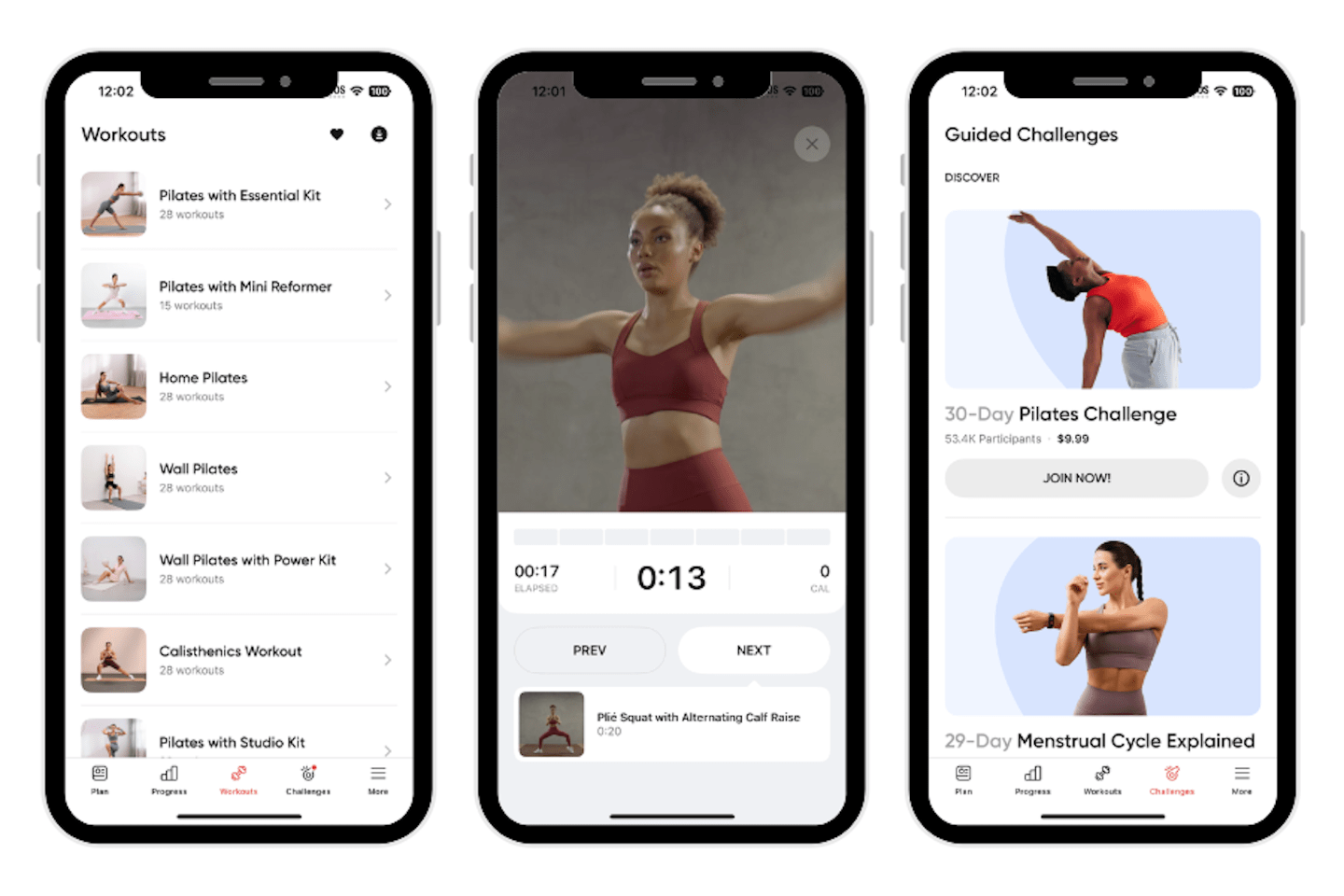
- Workout types: Wall Pilates, Pilates, calisthenics, yoga, strength training, HIIT, stretching, walking and treadmill plans, plus recovery and chair/wheelchair sessions
- Who it’s for: Anyone wanting guided, at‑home routines with mindset and nutrition support.
- What makes it different: The app puts an emphasis on accessibility (mobility‑friendly tracks)
Pros
- Very beginner‑friendly and accessible interface
- Wide variety of inclusive, low‑impact and Pilates‑style programs
- Nutrition, water, and habit tracking built into the same platform
Cons
- Pricing, free trial details, and cancellation flow can feel confusing
- Some workouts and plans may feel repetitive over time
- Higher‑touch coaching and some features locked behind extra paywall
Our Thoughts on BetterMe
BetterMe is our pick for the best workout app overall because it has a great variety of workout modalities, including plenty of strength training. We also love that the app offers an onboarding quiz, guided plans, and daily checklists remove decision fatigue, making it easier for beginners and busy users to stay consistent with their strength programs. The app covers a wide spectrum of needs—low-impact and wall Pilates, strength, walking, chair and mobility sessions, plus mindset and nutrition tools—so users can progress or scale back without leaving the platform.
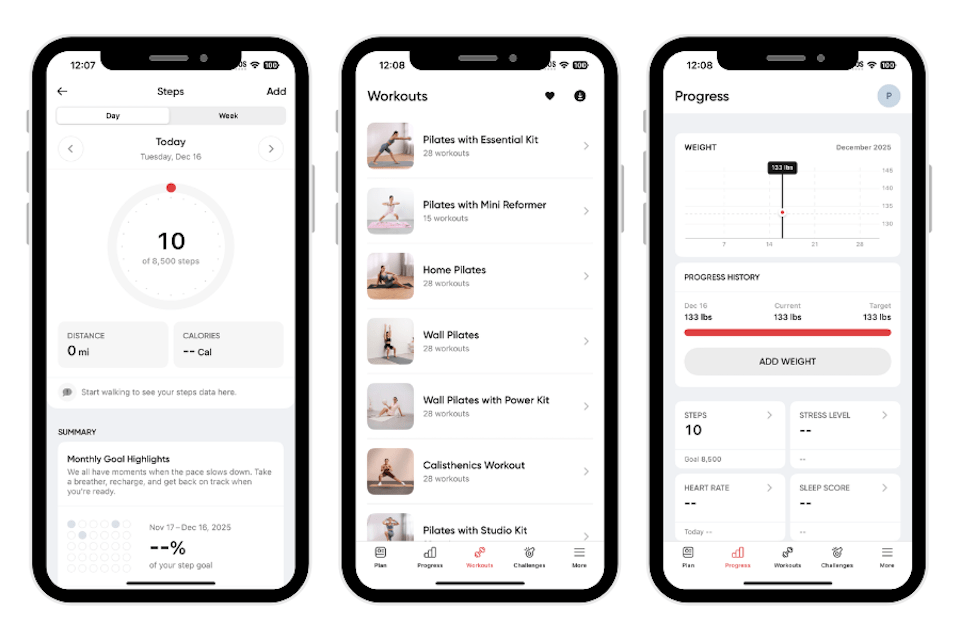
Paige tested BetterMe and found it reasonably priced, rating the pricing a 4 out of 5, noting that “The baseline price is 14.99 per month. The app was easy to set up but there were so many pop ups encouraging me to upgrade to lose weight faster, when my goal wasn’t weight loss,” our tester noted. Once past the initial upsell flow, overall ease of use scored a 5 out of 5 thanks to a clean layout and obvious next steps: “There are easy tabs listed at the bottom and it is very cleanly laid out and self-explanatory. It easily describes what it recommends doing every day.”
From an accountability and workout‑quality standpoint, BetterMe performed well. Accountability received a 4 out of 5 score. The app offers challenges and group workouts you can join, but they are an extra up charge, according to Paige.
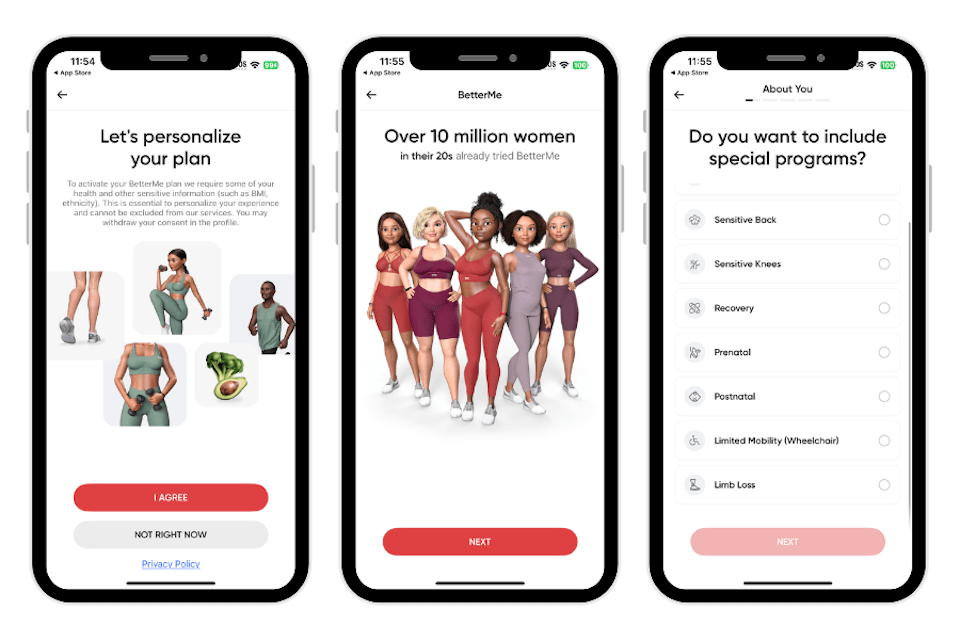
“There are also push notifications that remind you to keep accountable,” she added. Workout variety and instructions both scored highly (5 out of 5 each) because, as Page described, “There is an extensive list of workouts within each genre of workout … I really appreciate the workout variety and felt it kept me excited,” and videos include audio prompts, timers, and the option to cast to a bigger screen.
For progressive overload, Paige gave it a 5 out of 5 and highlighted that: “Each workout is labeled as newbie, medium, advanced. And I feel like it really aligns with the workout and allows for progressive overload.”
“Most of the workouts you can do without equipment. If the equipment is recommended it is minimum,” with the option to purchase the same items used in the videos. “The interactive aspects are an upcharge. Some users may not want to pay more than baseline for these features. The baseline price is very fair, I think it would be better if some of the upcharges were cheaper,” Paige said. Although, the chat was easy to open. Someone responded immediately and was very willing to help with my request.”
Best Workout App for Muscle Gain: SHRED
SHRED
| Fortune score | 4/5 |
at SHRED
- Our thoughts: Excellent for lifters who want smart, progressive programming
- Workout types: Guided strength training, bodybuilding-style splits, full‑body and upper/lower routines, circuits and supersets, plus optional HIIT, cardio, and studio‑style classes
- Who it’s for: Beginner to intermediate lifters who want to gain muscle and strength
- What makes it different: Adaptive AI that asks “How was that?” after sets and then fine‑tunes future sessions
Pros
- Adaptive AI progression that responds to your difficulty ratings and recovery
- Large library of strength workouts tailored to your equipment and goals
- Excellent exercise instruction with trainer‑led videos and clear form tips
Cons
- Circuit and superset emphasis can be awkward in crowded gyms
- Interface and dashboard can feel confusing at first for new users
- No true 1:1 human coaching offered
Our Thoughts on SHRED
SHRED is our pick for the best workout app for muscle gain because, through well-developed exercise programming and adaptive AI, it keeps pushing you just enough to grow. Instead of guessing which weights to use or when to progress, you rate each exercise’s difficulty and the app automatically adjusts loads, sets, and intensity in future workouts, which closely mimics how a good coach would nudge progressive overload. Its library of gym and home‑based strength sessions, bodybuilding splits, and hypertrophy‑focused circuits gives lifters many ways to train the same muscle groups while still following a coherent plan, which is ideal for building muscle without boredom.
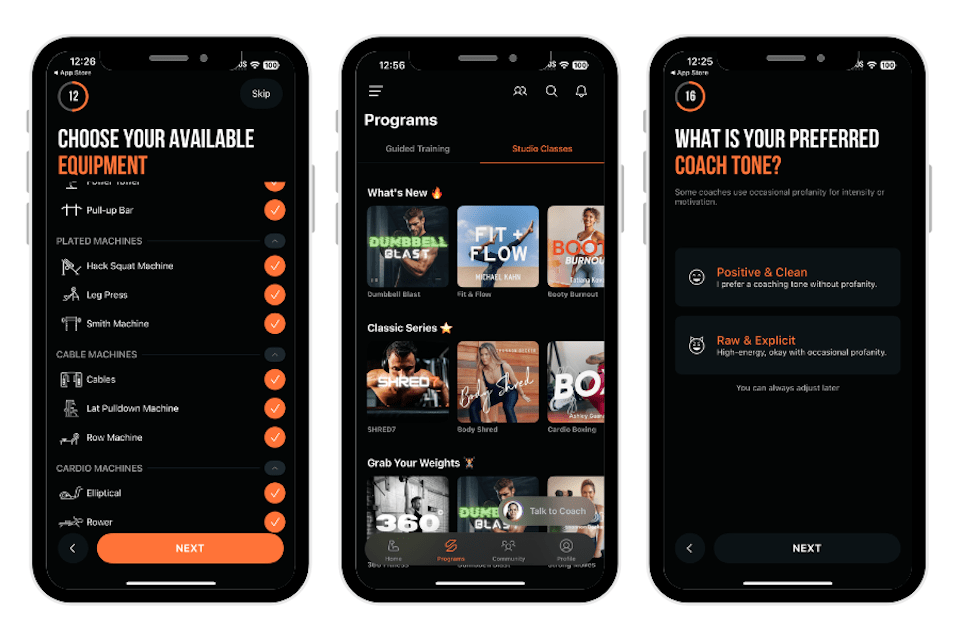
Paige tested SHRED, rating the setup of the app as a 3 out of 5. “The app was semi-simple to set up, though there were a lot of options that were kind of overwhelming to sort through when asking what I have access to in the gym. Otherwise, I liked the customizability!” Ease of use received a 3 out of 5 rating as well, with the interface described as powerful but busy: “The workouts are separated by several categories (coach, split, equipment, goal, skill level) which made it a little confusing to find what I want. It felt like there were too many options which could be overwhelming for a beginner.”
Where SHRED really shines is accountability, instructions, variety, and interaction. Accountability earned a 5 out of 5 score: “This app is great for accountability,” our tester said. “There are notifications and always access to your coach that you are able to personalize. I felt very supported and motivated while using this app. I appreciated the visual, verbal, and text tips during these workouts. It helped a lot with form.”
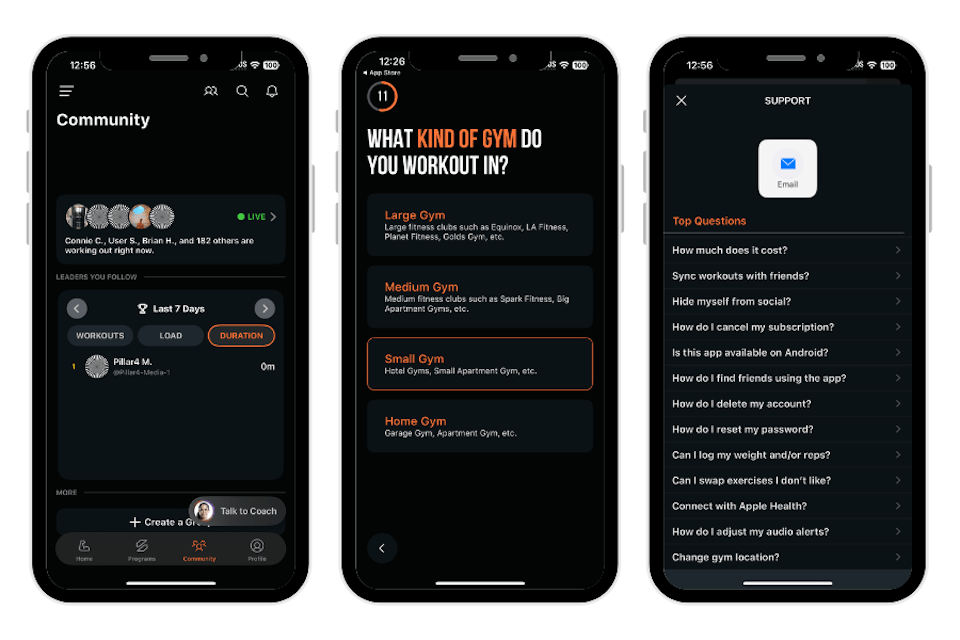
Workout variety and progressive overload both received a 5 out of 5, as there were “so many workouts for any type of strength training you want” and “a variety of rep and weight recommendations” with the trainer suggesting when to increase weights.
Paige loved the community aspects of SHRED, writing: “I appreciate that you can chat with your coach at any time. There is a whole community tab with leaderboards which made me feel very involved. I appreciated how there are not a lot of upcharges. The baseline price includes everything that you need for a successful workout plan,” and support was “very easy to reach,” with immediate, relevant responses in our tester’s experience.
Best Workout App for Weight Loss: Reverse Health
Reverse Health
| Fortune score | 4.5/5 |

at Reverse Health
- Our thoughts: One of the few programs that truly centers on menopause, hormones, and long‑term behavior change
- Workout types: Wall Pilates, yoga, gentle strength training, resistance‑band and bodyweight circuits, low‑impact cardio, walking, and occasional low‑impact HIIT or incline walks
- Who it’s for: Women 40+ dealing with perimenopause or menopause symptoms
- What makes it different: Hormone‑aware programming, 1:1 coaching options, education on metabolism and habits, and community support
Pros
- Designed specifically for women 40+ and menopause‑related weight gain
- Strong accountability via coaching, check‑ins, and community support
- Sustainable nutrition with “realistic” meal plans and education, not crash diets
Cons
- More expensive than many generic weight loss apps
- Can feel data‑heavy and overwhelming for beginners who dislike tracking
- Requires subscription after trial
Our Thoughts on Reverse Health
Reverse Health is our pick as the best workout app for weight loss because it tackles the specific, often overlooked challenges of losing weight after age 40 instead of offering one‑size‑fits‑all diet advice.

The program builds a structured 12‑week roadmap that weaves together hormone‑friendly nutrition, low‑impact strength and cardio, and habit coaching, making it easier to follow through and see gradual, sustainable fat loss rather than dramatic rebounds. Its emphasis on realistic, “doable even with a family” meal plans and optional 1:1 coaching creates a high level of accountability and support, especially valuable for users who have tried generic apps without success.
After using the program for just over a week, our tester, Paige, gave her overall experience a 5 out of 5 score, writing: “My overall experience was great. I could absolutely see myself using this app long term to reach my goals. It was easy to stick to and fun to navigate.”
Our tester was especially impressed with the ease of use for Reverse Health, rating the instructions a 5 out of 5. Paige loved taking advantage of the program’s meal plan recipes, trying a few out for herself. “The meals were surprisingly simple and satisfying. I did not feel like I was going hungry,” she said. “Plus, the recipes were very easy to follow and had simple ingredients.”
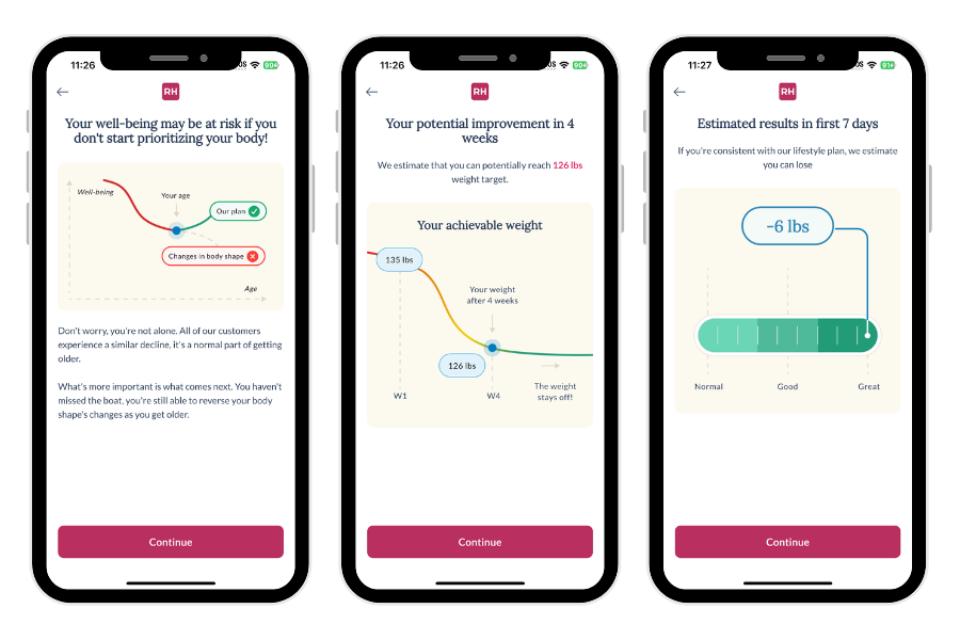
On accountability, our team also gave Reverse Health an overall 5 out of 5 rating. The app sends push notifications as reminders to track food or complete workouts. Additionally, the program was incredibly customizable in Paige’s experience, making it easy to apply Reverse Health to her daily lifestyle.
We enjoyed that Reverse Health offered inclusive imagery for all body types, so the program felt supportive, according to Paige. “My only comment is that the pictures in the beginning while registering were clearly AI generated, and it would’ve been more encouraging to see real photos,” she said. That being said, Paige liked that she didn’t feel anything about the app was pressuring or shame-inducing.
“My overall experience with this program was great! I loved the interface and how easy it was to navigate,” Paige added. “I personally liked the food tracking side the most and felt it gave the most data. The exercise portion was best at helping me feel good.”
If you’re looking for more nutritional support, we suggest checking out our best meal delivery services for weight loss, or trying out Noom in combination with Reverse Health.
Best Free Workout App: WalkFit
WalkFit
| Fortune score | 4/5 |
at WalkFit
- Our thoughts: A great fit for people who need a structured, GPS‑backed walking routine to boost daily steps and support weight loss
- Workout types: Guided walking workouts (indoor treadmill and outdoor), interval‑style walks with changing pace or incline, step‑based challenges, and occasional low‑impact cardio sessions
- Who it’s for: Anyone wanting low‑impact, joint‑friendly cardio that can be done anywhere with no equipment.
- What makes it different: Highly tailored walking plans based on BMI and activity level, strong GPS mapping and stats
Pros
- Very beginner‑friendly and easy to follow
- Accurate GPS and step tracking with clear route and progress visuals
- Effective progressive overload in walking plans by increasing time, pace, or intensity over weeks
Cons
- Core features and full plans require a paid subscription after the trial
- Limited strength or cross‑training options; very walking‑centric
- Pricing can be higher than some competing walking or step‑tracking apps
Our Thoughts on WalkFit
WalkFit is our pick for the best free workout app because it offers an easy gateway into regular exercise: you can download it at no cost, explore the interface, and use the trial to experience structured, GPS‑backed walking plans before deciding whether to pay. For many people who are starting from low activity levels, simply having daily walking goals, route maps, and motivational prompts is enough to dramatically increase steps and build cardiovascular fitness without equipment or a gym membership.
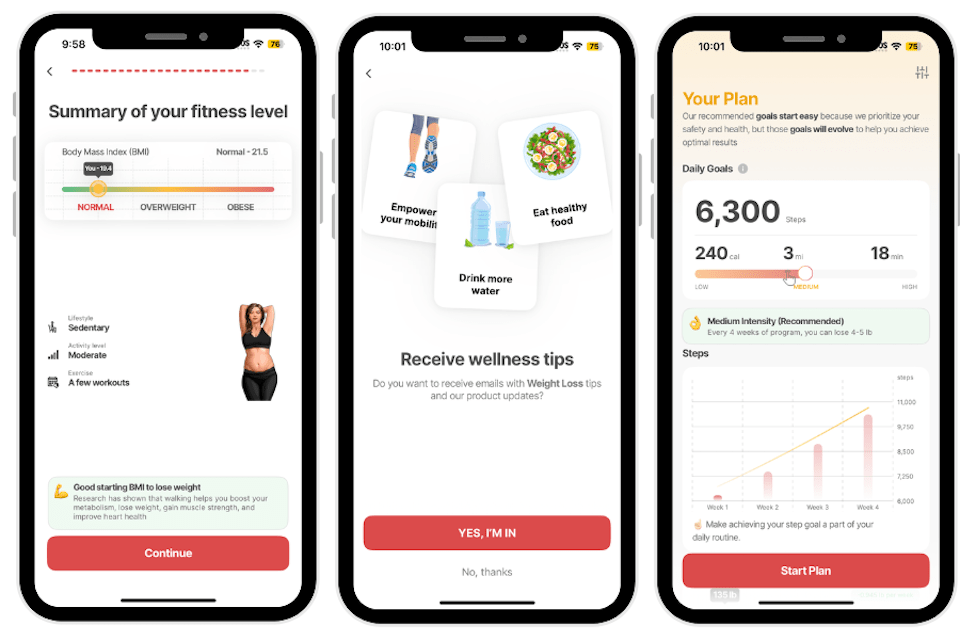
Paige tested Walkfit, rating setup as a 5 out of 5: “The app was very easy to set up and guided you through the process with lots of options,” she said. For ease of use, she rated the app a 3 out of 5—the interface is very straightforward, perhaps to a fault: “The app is very easy to use and navigate,” she said. “It honestly is a little oversimplified which can be helpful for some individuals.”
Accountability received a 4 out of 5 rating from Paige, mainly driven by motivational communication: “This app is great with accountability, it gives you the options to receive emails with motivational quotes which keep you going,” she said. “There is good verbal guidance and timing cues. The GPS is accurate in showing where you have walked.”
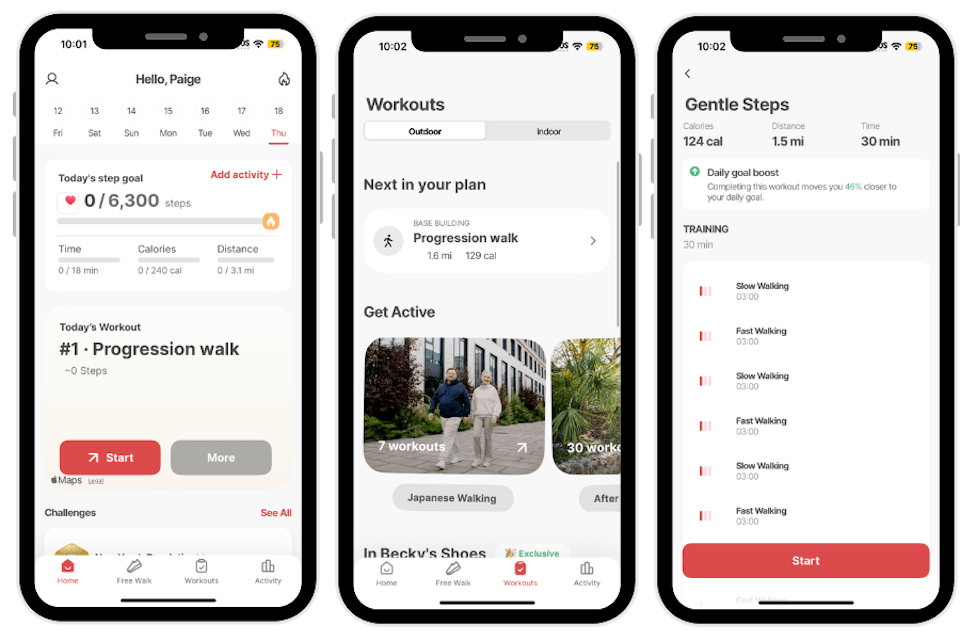
After trying several workouts, she scored the variety as a 3 out of 5, acknowledging that while there are different options, the walking‑only focus can feel repetitive: “There was a good variety of workouts. I do feel like it is just based around walking that some of them were pretty repetitive. I appreciate that there were indoor and outdoor options.”
Progressive overload was rated 5 out of 5, with the app effectively designing progression into walking plans: “The app figured out how to incorporate progressive overload into walking workouts. I was able to escalate time and pace. Since this app is based around walking, you do not need any equipment. Some of the indoor workouts require equipment that could easily be subbed out for other household items.”
Paige would have liked some community interaction, noting that, “The app has no interactive aspects or coaching, and is quite expensive. The baseline had a very big price difference from the upgrade which was over $100.”
Best Workout App for Beginners: Muscle Booster
Muscle Booster
| Fortune score | 4/5 |
at Muscle Booster
- Our thoughts: A strong starter option for beginners who want guidance on what to do each day without designing their own strength or weight‑loss program
- Workout types: Muscle‑building strength sessions, calisthenics and bodyweight workouts, weight‑loss and cardio routines, morning and recovery sessions, plus home and full‑gym programs
- Who it’s for: Beginners through intermediates who want clear, follow‑along workouts
- What makes it different: A smart algorithm that tailors plans to your level, tracks which muscles you’ve trained, and nudges intensity up as you progress
Pros
- Very structured, personalized plans that are beginner‑friendly and scale up over time
- Large exercise library and workout variety for both home and gym
- Clear visual and audio guidance, with offline access to downloaded workouts
Cons
- Subscription‑based with no fully free long‑term tier
- Some users report clunky exercise browsing and less‑than‑perfect personalization
- Occasional complaints about billing clarity and needing to cancel through app stores
Our Thoughts on Muscle Booster
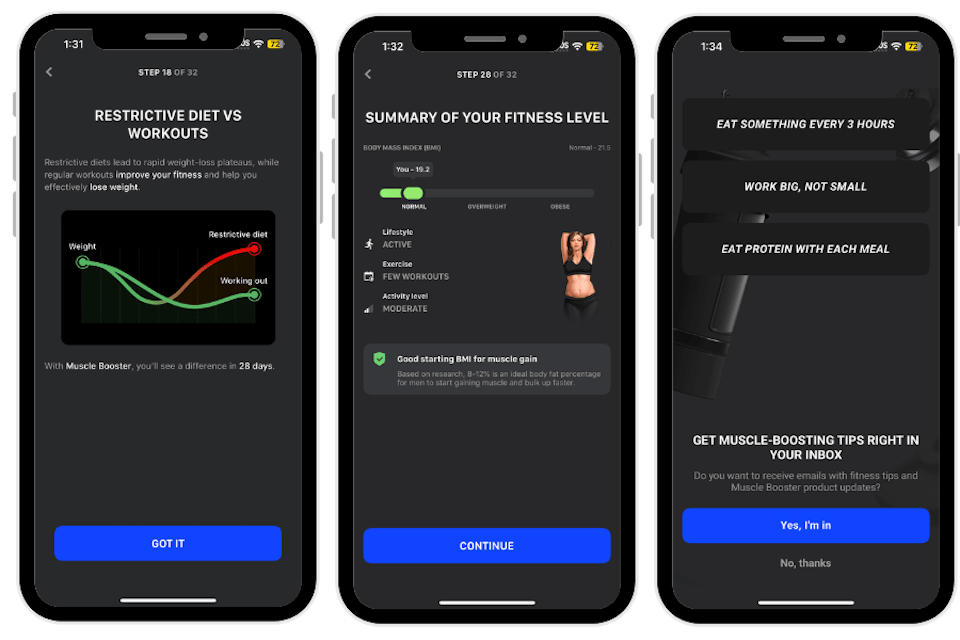
Muscle Booster is our pick for the best workout app for beginners because it removes much of the guesswork that can make starting a fitness routine intimidating. Instead of having new users choose from hundreds of random workouts, the app walks you through a detailed onboarding, then builds a tailored plan that specifies exercises, sets, reps, rest, and even estimated duration, so each session feels planned out and manageable. The fact that you can train effectively at home with bodyweight or simple equipment, then transition into fuller gym routines as confidence grows, makes it ideal for someone progressing from true beginner to intermediate.
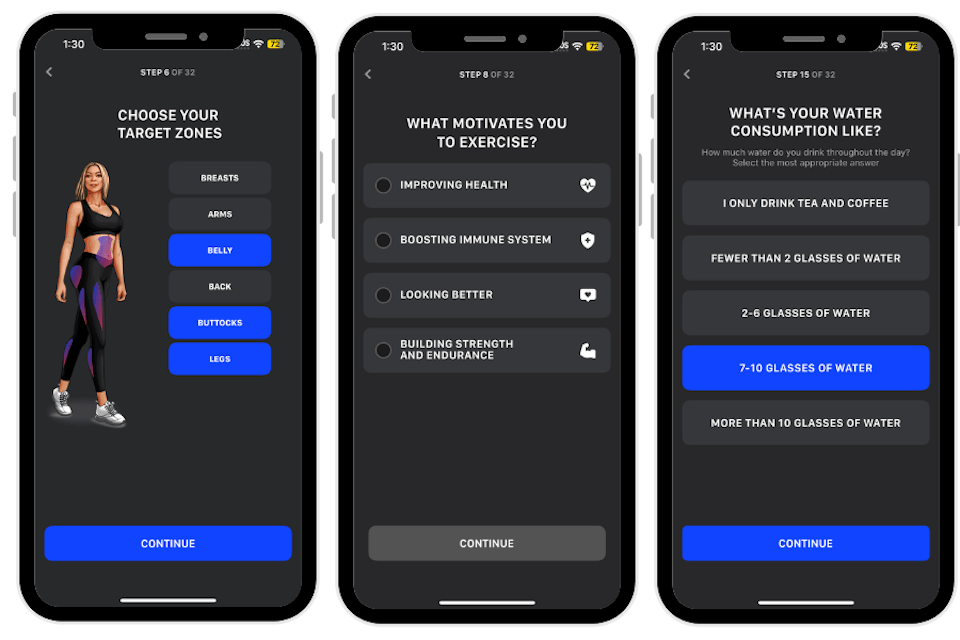
Paige tested Muscle Booster, rating the initial setup as a 5 out of 5: “This app setup is very easy and guides you through the process. It was kind of a long process.” She found the app easy to use, rating it a 5 out of 5 as well in this category. “I really appreciate the layout of this app. It organizes workouts by how much time you have to workout so you can get in short ones if you’re pressed for time.”
She scored accountability as a 4 out of 5—it is driven by ongoing communication rather than live coaching. “The app sends email tips for diet and exercise which is nice for accountability,” she said. “The workouts took a little while to download, but the visual and verbal cures were very helpful. There were time cues to tell you when to switch workouts.”
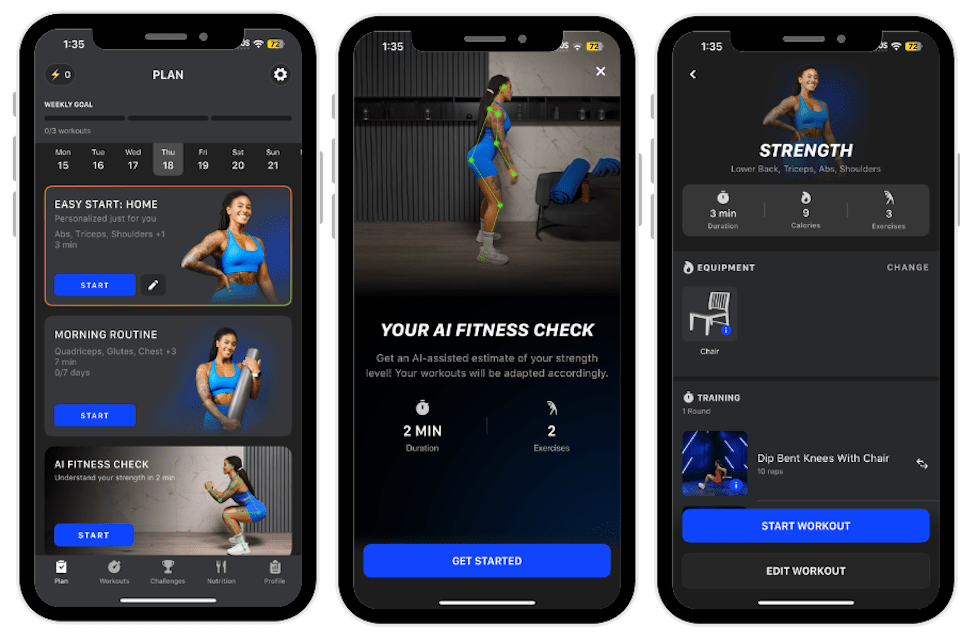
Paige also loved the variety of the workouts offered: “I loved the customizability of the workouts, it felt like I had unlimited options. You are able to progressively overload very well since the workouts are customizable,” she said. Some of the workouts required equipment but most of it can be found around your house. “I think this app is a good deal due to the variety of workouts and nutritional guidance.”
How We Tested and Selected the Best Workout Apps
Our team underwent hands-on testing of each app’s setup, usability, workout quality, and overall value, with a special focus on how well they support consistency over time. We looked for apps that are not only effective, but realistic to stick with for different lifestyles and fitness levels.
Setup and Ease of Use
Testers paid close attention to how easy or difficult it was to download and set up each app, from account creation to any onboarding quizzes. Clear navigation, intuitive layouts, and obvious “do this today” guidance were prioritized so users could get moving quickly without feeling overwhelmed.
Accountability
Accountability features were a major factor, since different people need different levels of encouragement. Some apps offer high-touch support such as real-life personal trainers or in‑app coaching, while others rely on push notifications, streaks, check-ins, and community elements; the aim was to include a range of options across this spectrum.
Exercise Instructions
Depending on the app style, testers prioritized options that provide safe, easy-to-follow exercise instructions, including clear videos and verbal cues. Extra visuals like timers, rep counters, pacing guidance, and alternative angles or modifications were rated highly because they help with form and confidence, especially for beginners.
Programming
Where applicable, apps were favored if they offered thoughtful training plans that incorporated progressive overload. In practice, this meant built‑in improvement plans that gradually increased weights, sets, reps, distance, or intensity over time, rather than random standalone workouts.
Value
For value, the team weighed all of these factors—features, coaching depth, workout quality, and flexibility—against the typical monthly subscription price.
How to Find the Best Workout App for You
Choosing the right workout app starts with knowing yourself—your goals, schedule, budget, and how much structure you actually enjoy. A good fit will feel realistic to stick with most days of the week, not just exciting for the first few workouts.
Your Fitness Goals
Different people have very different reasons for working out: fat loss, muscle gain, cardio health, mobility, or simply moving more during the day. Clarifying your main goal (and a secondary one) helps you quickly filter apps into categories like strength, running, walking, yoga, or all‑in‑one training. Once you know whether you want structured strength cycles, simple step targets, or low‑impact routines, it becomes much easier to ignore apps that don’t truly match your needs.
Accountability
Accountability needs vary a lot depending on lifestyle and personality. If you struggle to stay consistent, you may want coaching, check‑ins, leaderboards, or reminders that nudge you to show up. If you’re already in a routine, simple streak tracking, calendar views, or progress charts might be enough. When choosing an app, think about whether you want human interaction, app‑based nudges only, or almost no external pressure.
Instructions
Instruction style is another personal preference. Experienced lifters or runners might be fine with minimal cues, as long as sets, reps, or distances are clearly laid out. Beginners, people returning from injury, or anyone unsure about form usually benefit from detailed demonstrations, step‑by‑step videos, and clear modifications. Look for an app whose level of guidance matches how confident you feel performing exercises on your own.
Cost
Budget is a big factor, even though most workout apps cost far less than regular sessions with a personal trainer. Some are free or offer limited free tiers, while others charge a monthly or annual subscription. Think about what you realistically will use—if you won’t tap into coaching or advanced features, you may not need the most expensive option. Paying for a plan is only worth it if it helps you stay more consistent than you would with free content.
Benefits of Workout Apps
Workout apps can be powerful tools when they match your needs. Here are some benefits:
- Structure and planning: having a clear program instead of guessing
- Flexibility and convenience: home, gym, travel, short or long sessions
- Tracking progress: seeing improvements in strength, distance, or consistency
- Motivation and accountability: reminders, challenges, and milestones
What to Avoid in Workout Apps
There are also a few red flags to watch for when you’re evaluating options.
- Confusing or misleading pricing, trials that auto‑renew without clear reminders, or hard‑to‑find cancellation options
- Poor or unsafe exercise instruction, especially if you’re a beginner or lifting heavy
- Overly aggressive claims (like guaranteed extreme results in a couple of weeks) with no focus on sustainable habits
- Apps that are created by non-credentialed individuals
- Apps that don’t offer the types of workouts that you enjoy
Frequently asked questions
What is the best workout app?
The best workout app depends on your goals, experience, and preferences—someone training for muscle gain might choose a strength‑focused app, while a beginner walker may prefer a simple, walking‑based program. The best option is the one you can use consistently and safely for months, not days.
Is there a 100% free workout app?
Yes, there are fully free apps and platforms, and many paid apps have free tiers with limited features. You’ll usually trade off personalization, coaching, or advanced tracking at the free level, but free options can still work well.
Do workout apps really work?
Workout apps can be very effective when you use them consistently and choose plans that match your fitness level and goals. They provide structure, reminders, and progression, but results still depend on your effort, recovery, and nutrition outside the app.