• Home
  • Latest
  • Fortune 500
  • Finance
  • Tech
  • Leadership
  • Lifestyle
  • Rankings
  • Multimedia
TechSamsung

DeX Review: Getting Files and Photos From a Samsung Phone to a Computer Is Easier Than Ever

By
Aaron Pressman
Aaron Pressman
Down Arrow Button Icon
By
Aaron Pressman
Aaron Pressman
Down Arrow Button Icon
November 14, 2019, 10:00 AM ET

Like the grand unified theory of physics that never quite arrived, gadget lovers dream of a unified computing world in which every screen—large and small—is a window on the same apps, services, and files.

No more iPhone versus Mac, Android versus Windows, or Chromebook versus Fitbit. From desk to lap to hand to wrist, it would be one seamless world.

The dream is nowhere near a reality, and it may never be. But leading Android phonemaker Samsung is still trying, following some similar efforts by Apple.

Two different programs are available that connect Samsung phones more closely with computers, or at least some computers. There’s Samsung’s own DeX program, introduced in 2017, and then Microsoft’s similar service, Your Phone Companion, which debuted this year.

Both feature nifty tricks to improve productivity. But in the end, DeX is more capable and Microsoft is more convenient.

Let’s start with Dex, which requires downloading a companion program onto your Windows or Mac PC, and then connecting it to your phone with a USB cord. I linked two home desktop computers and a laptop with a brand new Galaxy Note 10 phone.

As soon as you plug the Note into a computer, the companion DeX program pops up on your PC’s screen. It looks a lot like a PC desktop rather than just a stretched version of your phone’s screen. From there, you can run any mobile app to do whatever you do on your phone, including texting, web browsing, and Instagramming—all while using your full-size keyboard and mouse or trackpad. It works on laptops, too.

Data flows easily between the two environments. I dragged a Microsoft Word document from my Mac onto the DeX window and, later, back onto my phone, and then opened the file with the Android version of Word.

Likewise, it was easy to drag a photo, or several photos, from Samsung’s Gallery phone app in DeX to my Mac’s desktop, where I could edit them on the big screen. However, sometimes I had trouble dragging files from DeX to drop on my Mac’s desktop. But after repeated mouse clicks, they transferred.

Aside from easily moving files and photos, however, I’m unsure how useful it is to run mobile apps on a PC. Maybe you really love the Twitter client on your Note? Or maybe there’s some other mobile app that you can’t live without and want to use while sitting at your desk looking at a big screen? But it’s not a common scenario. And some mobile apps don’t transition easily to appearing on a bigger screen.

That’s probably why Apple hasn’t gone there with its apps for the Mac and iPhone. In Apple’s ecosystem, users accessing an app on one device can slip seamlessly onto another Apple device and see the same content, but on that device’s own appropriate app.

For example, with the continuity feature, if I’m reading a web site on my iPhone and I sit down at my iMac, an icon pops up on the dock to take me to that same web site. But on the phone, I was in the mobile Safari app and on the iMac I get the Mac version of Chrome. That seems like a smarter way to connect mobile and desktop devices. Apple also shares photos and text messages across apps using the cloud, a slicker solution than dragging and dropping from DeX.

A whole other approach for connecting phones is Microsoft’s Your Phone Companion, which only works with Windows computers. Still, it dramatically simplifies connecting two devices—no cable required.

Once I added the necessary apps to my Windows PC and Samsung Galaxy Note, creating a wireless connection was simple. I merely opened the app on my PC with the phone nearby.

With Microsoft’s service, using phone apps on the PC is simpler but also more limited than with DeX. Built into the PC app are just three functions: photos, messages, and notifications.

Each one allows you to use your PC to interact with related data on your phone, such as old text messages or photos. For example, it’s easy to search through previous messages or send a new text using your PC keyboard and screen. Or you can grab a photo from your phone to include in an email sent from your PC (though the app only shows a couple dozen of your most recent photos).

With both devices sitting side by side, all interactions are speedy. New photos show up immediately and file transfers are quick.

However, using some other parts of your phone’s functions is weird. The PC app can display a duplicate version of your phone’s screen in the same rectangular size and shape of your phone’s screen. You can click on any app on this duplicate phone screen and use it like you would on your phone. While doing so, the action is mirrored simultaneously on your phone’s actual screen.

It’s like a ghost. It saves you from having to physically pick up your phone to access mobile apps while you’re sitting at your PC, although that’s not exactly a giant benefit.
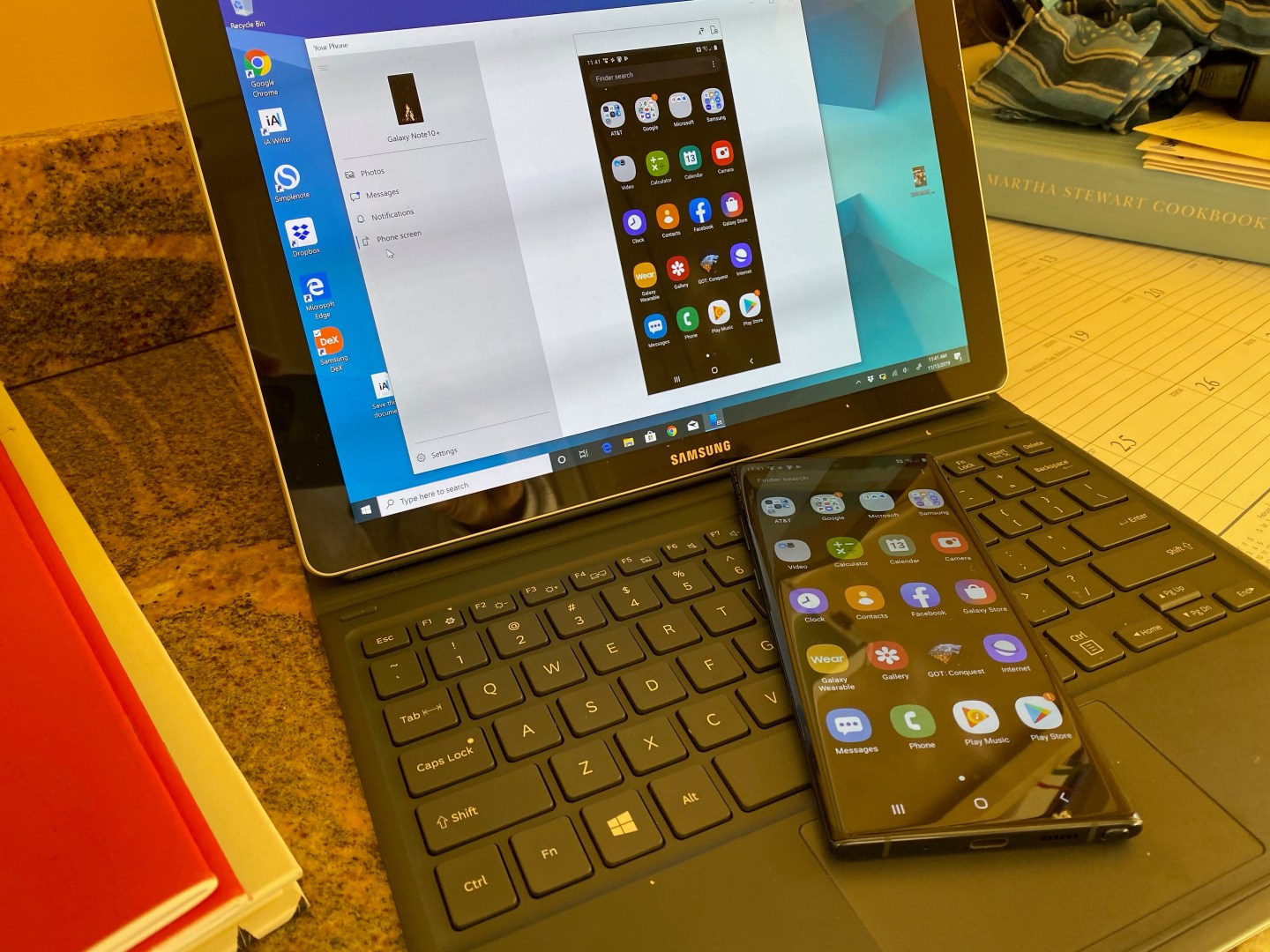
microsoft your phone companion app

Another oddity is that all sound is through your phone’s speaker. At first, while trying to watch a YouTube video from the PC app, I thought the video was muted. Then I realized the sound was coming from my phone’s tiny speaker. Yes, I could watch a video. But it wasn’t ideal.

The bottom line is that Microsoft’s Phone Companion app provides a quick and simple way to access a few key mobile apps directly from your PC. Meanwhile, Samsung’s DeX does a lot more, but maybe more than the average user needs.

More must-read stories from Fortune:

—Hideo Kojima on Death Stranding and more
—Review: Apple Watch Series 5 is insanely great
—Workers are worried robots will steal their jobs
—Apple tackles California’s housing crisis amid Apple TV Plus questions
—New bank offers 3% interest rate for “good behavior”
Catch up with Data Sheet, Fortune’s daily digest on the business of tech.


About the Author
By Aaron Pressman
See full bioRight Arrow Button Icon

Latest in Tech

Finance
Lorem ipsum dolor sit amet, consectetur adipiscing elit, sed do eiusmod tempor incididunt ut labore et dolore magna aliqua. Ut enim ad minim veniam
By Fortune Editors
October 20, 2025
Finance
Lorem ipsum dolor sit amet, consectetur adipiscing elit, sed do eiusmod tempor incididunt ut labore et dolore magna aliqua. Ut enim ad minim veniam
By Fortune Editors
October 20, 2025
Finance
Lorem ipsum dolor sit amet, consectetur adipiscing elit, sed do eiusmod tempor incididunt ut labore et dolore magna aliqua. Ut enim ad minim veniam
By Fortune Editors
October 20, 2025
Finance
Lorem ipsum dolor sit amet, consectetur adipiscing elit, sed do eiusmod tempor incididunt ut labore et dolore magna aliqua. Ut enim ad minim veniam
By Fortune Editors
October 20, 2025
Finance
Lorem ipsum dolor sit amet, consectetur adipiscing elit, sed do eiusmod tempor incididunt ut labore et dolore magna aliqua. Ut enim ad minim veniam
By Fortune Editors
October 20, 2025
Finance
Lorem ipsum dolor sit amet, consectetur adipiscing elit, sed do eiusmod tempor incididunt ut labore et dolore magna aliqua. Ut enim ad minim veniam
By Fortune Editors
October 20, 2025

Most Popular

Finance
Lorem ipsum dolor sit amet, consectetur adipiscing elit, sed do eiusmod tempor incididunt ut labore et dolore magna aliqua. Ut enim ad minim veniam
By Fortune Editors
October 20, 2025
Finance
Lorem ipsum dolor sit amet, consectetur adipiscing elit, sed do eiusmod tempor incididunt ut labore et dolore magna aliqua. Ut enim ad minim veniam
By Fortune Editors
October 20, 2025
Finance
Lorem ipsum dolor sit amet, consectetur adipiscing elit, sed do eiusmod tempor incididunt ut labore et dolore magna aliqua. Ut enim ad minim veniam
By Fortune Editors
October 20, 2025
Finance
Lorem ipsum dolor sit amet, consectetur adipiscing elit, sed do eiusmod tempor incididunt ut labore et dolore magna aliqua. Ut enim ad minim veniam
By Fortune Editors
October 20, 2025
Finance
Lorem ipsum dolor sit amet, consectetur adipiscing elit, sed do eiusmod tempor incididunt ut labore et dolore magna aliqua. Ut enim ad minim veniam
By Fortune Editors
October 20, 2025
Finance
Lorem ipsum dolor sit amet, consectetur adipiscing elit, sed do eiusmod tempor incididunt ut labore et dolore magna aliqua. Ut enim ad minim veniam
By Fortune Editors
October 20, 2025
Rankings
  • 100 Best Companies
  • Fortune 500
  • Global 500
  • Fortune 500 Europe
  • Most Powerful Women
  • Future 50
  • World’s Most Admired Companies
  • See All Rankings
Sections
  • Finance
  • Leadership
  • Success
  • Tech
  • Asia
  • Europe
  • Environment
  • Fortune Crypto
  • Health
  • Retail
  • Lifestyle
  • Politics
  • Newsletters
  • Magazine
  • Features
  • Commentary
  • Mpw
  • CEO Initiative
  • Conferences
  • Personal Finance
  • Education
Customer Support
  • Frequently Asked Questions
  • Customer Service Portal
  • Privacy Policy
  • Terms Of Use
  • Single Issues For Purchase
  • International Print
Commercial Services
  • Advertising
  • Fortune Brand Studio
  • Fortune Analytics
  • Fortune Conferences
  • Business Development
About Us
  • About Us
  • Editorial Calendar
  • Press Center
  • Work At Fortune
  • Diversity And Inclusion
  • Terms And Conditions
  • Site Map
  • Facebook icon
  • Twitter icon
  • LinkedIn icon
  • Instagram icon
  • Pinterest icon

© 2026 Fortune Media IP Limited. All Rights Reserved. Use of this site constitutes acceptance of our Terms of Use and Privacy Policy | CA Notice at Collection and Privacy Notice | Do Not Sell/Share My Personal Information
FORTUNE is a trademark of Fortune Media IP Limited, registered in the U.S. and other countries. FORTUNE may receive compensation for some links to products and services on this website. Offers may be subject to change without notice.


Most Popular

placeholder alt text
Success
In 2026, many employers are ditching merit-based pay bumps in favor of ‘peanut butter raises’
By Emma BurleighFebruary 2, 2026
2 days ago
placeholder alt text
Economy
Trump may have shot himself in the foot at the Fed, as Powell could stay on while Miran resigns from White House post
By Eleanor PringleFebruary 4, 2026
10 hours ago
placeholder alt text
Cybersecurity
Top AI leaders are begging people not to use Moltbook, a social media platform for AI agents: It’s a ‘disaster waiting to happen’
By Eva RoytburgFebruary 2, 2026
2 days ago
placeholder alt text
Investing
Tech stocks go into free fall as it dawns on traders that AI has the ability to cut revenues across the board
By Jim EdwardsFebruary 4, 2026
15 hours ago
placeholder alt text
North America
Gates Foundation doubles down on foreign aid as U.S. government largely withdraws
By Thalia Beaty and The Associated PressFebruary 3, 2026
2 days ago
placeholder alt text
Politics
Meet the Palm Beach billionaire who paid $2 million for a private White House visit with Trump
By Tristan BoveFebruary 3, 2026
1 day ago

Latest in Tech

A man in a suit wearing glasses.
Big TechAlphabet
Alphabet plans to double capex spending to a possible $185 billion—but it’s keeping CEO Sundar Pichai up at night
By Amanda GerutFebruary 4, 2026
2 minutes ago
electricity
EnvironmentElectricity
Over a million people are losing power during a freezing snowstorm while data centers nearby guzzle electricity
By Nikki Luke, Conor Harrison and The ConversationFebruary 4, 2026
4 hours ago
Phone displaying quantum computing company IonQ's logo.
Big Techquantum computing
IonQ, the biggest quantum computing company on the stock market, disputes short-seller claims it failed to disclose holes in its revenue
By Jeremy Kahn and Jim EdwardsFebruary 4, 2026
4 hours ago
altman
Startups & VentureMarkets
Scott Galloway predicts OpenAI could pull its IPO amid AI ‘vibe shift’ as investors ‘gag’ on Trump proximity, questionable revenue
By Nick LichtenbergFebruary 4, 2026
5 hours ago
AILayoffs
Pinterest cracks down on dissent, fires engineers for an internal layoff tool as AI shake-ups keep employees on edge and in line
By Marco Quiroz-GutierrezFebruary 4, 2026
5 hours ago
McNuggets
Travel & LeisureMcDonald's
McDonald’s wants you to eat caviar McNuggets this Valentine’s Day
By Dee-Ann Durbin and The Associated PressFebruary 4, 2026
5 hours ago