After Apple Watch became real, a car soon became the top entry on consumers’ wish lists for Apple’s next endeavor.
Motor Trend published a speculative story on Thursday surrounding the unannounced and unconfirmed “Apple Car.” Pointing toward high-profile hirings of automotive experts (including Tesla employees) and supposed conversations with California Department of Motor Vehicles, the car reviews magazine paints a picture of what we should expect from an Apple Car—assuming one even exists.
It’s a picture that’s likely inaccurate, but that’s to be expected. Apple is a secretive company, and yes, there’s enough tire smoke to indicate Apple is working on something involving cars. But we truly don’t know what it would be or what it would look like.
Get Data Sheet, Fortune’s technology newsletter.
The only concrete evidence of what we can maybe, sort of, expect Apple (AAPL) to do inside a vehicle is found in its CarPlay product.
Over the last week, I drove the closest thing we have to an Apple Car right now: a 2016 Chevy Malibu (GM) equipped with support for Apple CarPlay. Yet you could easily replace the make and model with any vehicle that supports CarPlay. A complete list of car manufacturers offering CarPlay compatible models can be found online. But Chevy was able to loan me a Malibu equipped with every possible safety feature imaginable—not to mention CarPlay and Android Auto support.
Apple first announced CarPlay in 2014 in a bid to make driving and using popular features on its smartphone safer for those behind the wheel. The service works on an iPhone 5 or newer.
This was my first experience with CarPlay, or for that matter, any sort of system designed to duplicate smartphone’s capabilities inside a car. I went into this experience unsure of what to expect, and I came out of it rather surprised by the overall experience. It’s far from perfect, as we’ll discuss below, but I’m sold now on the idea of Apple CarPlay, and by extension, Google’s Android Auto solution offering a comparable experience.
Read More: Consumers on Apple CarPlay and Android Auto: Meh
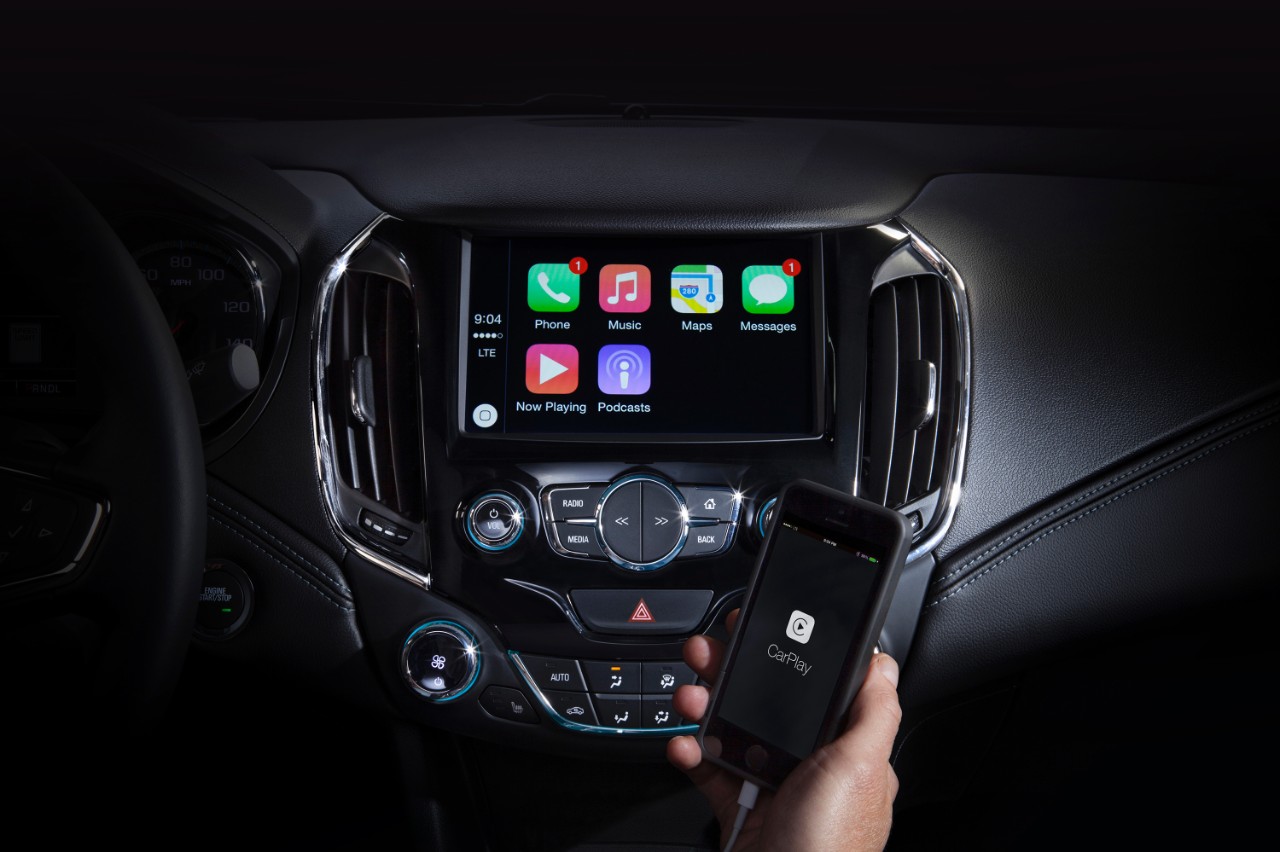
Initial setup was a breeze. Using my iPhone’s Lightning cable, I connected my smartphone to the Malibu. A prompt asked me to unlock my iPhone and grant the Malibu permission to access my device using CarPlay. This was a one-time setup process with future connections requiring that I simply connect my iPhone to the Lightning cable to begin using CarPlay.
With CarPlay activated, a familiar but limited grid of app icons displayed on the screen. Phone, Messages, Maps, Music, Podcasts, Now Playing, and Audiobooks populated first followed by MLB’s At Bat app.
Tucked on the left side of the screen is the time, signal indicator, and a digital home button identical to the physical home button found on your iPhone. You can tap on the home button to go back to the main screen, or press and hold it to bring up Siri.
Using Apple’s own apps will provide a nearly identical experience to those found on your iPhone, albeit a more simplified version. For example, the Music app contains the same navigation tabs along the top of the screen. You can view Apple Music’s For You section followed by New, Radio (including Beats1), Playlists, and My Music. For You and New were recently added when Apple released iOS 9.3 last month.
You can tap on a tab or button, swipe to scroll through a list, and select music to listen to with minimal effort thanks to a combination of familiarity and the oversized presentation of text and buttons on the CarPlay screen. If you’re accustomed to using the Music app on your iPhone, you’ll feel right at home using the CarPlay version.
The same experience is carried over to all of Apple’s CarPlay apps. In Messages, for example, immediately after tapping on the icon, Siri asks for the message recipient. After stating a name, Siri asks for the message body before the virtual assistant reads the text back for accuracy. Once done, Siri sends the message—all without you having to take your eyes off the road. Placing a phone call follows a similar process.
For about Apple and cars, watch:
Incoming message alerts scroll down from the top of the screen exactly as they do on the iPhone, but there’s no accompanying alert sound.
Maps will arguably be one of the most used apps for CarPlay users, and for the most part, it was as simple to use as Music or Messages. During two different road trips, I relied on Maps for navigation and to avoid long delays on the road. I could tell Siri where I wanted to go or select a destination from a list of recent searches conducted on my iPhone before getting in the car. A few seconds after selecting a destination, I was presented with a list of routes and ETA estimates.
On one occasion, I picked the shortest route only to get an alert a few minutes later that a revised route would save me five minutes. I accepted, and indeed, I arrived five minutes earlier than I was originally promised.
My only complaint about the Maps app was the inability to easily zoom in and out on a map while navigating. In fact, in order to zoom, I had to tap on the screen, which would bring up additional buttons, followed by tapping on a plus or minus icon in order to zoom in on the desired direction. Doing all of this while trying to drive was distracting. I would have much rather had the ability to quickly reach over and pinch-to-zoom on the map.
With Siri accessible via CarPlay, drivers and passengers can still ask questions such as “What’s the current temperature?” and Siri will dictate an answer to you. Siri stops short of providing more in-depth information, such as the weather forecast for the next week. Instead, Siri will respond that it’s unable to complete your request while CarPlay mode is active.
Of course, Siri can be used to send a message without having to interact with the Messages app at all, for example, by saying “Siri, send a message to Wife I’m on my way home.”
Apple allows some third-party developers to integrate with CarPlay, with apps such as MLB At Bat, Spotify, CBS Radio, and NPR One already available, to name a few.
MLB At Bat is the only CarPlay compatible app for which I have an active subscription, and my experience was anything but smooth. After tapping on the At Bat icon to open the CarPlay version of the app, I would often find a black screen with an “At Bat” label at the top. Despite waiting for the list of available games to populate, it never did. In order to get the app to work, I would have to view the app on my iPhone, wait for it to load available games, and only then would the list show up on the CarPlay screen. I duplicated this experience on two different iPhones.
I don’t think I would run out and buy a new car just to get CarPlay (or Android Auto). That would rival the $17,000 Apple Watch Edition as the most expensive iPhone accessory ever.
I can say that the next time I’m looking for a new car, one of the requirements will be CarPlay and Android Auto support. I love the idea of having the ability to transform my smartphone into a beneficial tool when I’m behind the wheel, instead of a distraction sitting in a cup holder.
Your guess is as good as mine when it comes to how much of the CarPlay experience will make its way into the mythical Apple Car. The tech giant is in the right position to test and collect user information at the expense of other car manufacturers that have taken on the burden of integrating CarPlay into their respective platforms.
Who knows? Maybe that data will one day turn our iPhones into a four-wheeled super computer someday. Until then, CarPlay is as close as we’re going to get to an Apple Car.