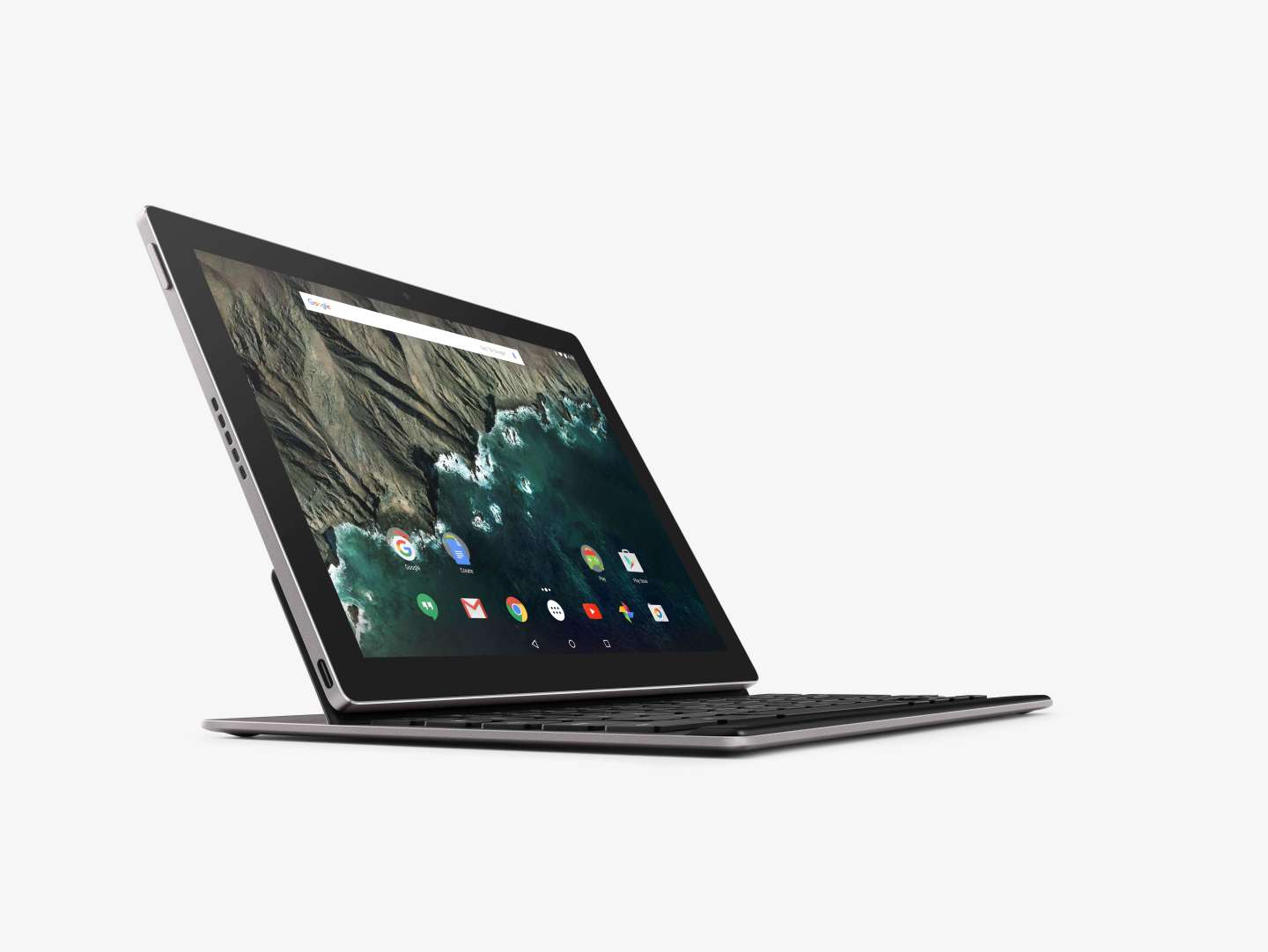
At an event in September, Google (GOOGL) announced updated Chromecast hardware and two new Nexus smartphones, and surprised those in attendance by announcing the first tablet built from the ground up by Google: the Pixel C.
Up until now, the Pixel namesake has been associated with Google’s Chromebook Pixel line. The laptops, also built by Google, run the company’s Chrome operating system. However, the Pixel C won’t run Chrome OS. Instead, it’s an Android tablet through and through.
While Google stopped short of declaring the Pixel C a PC replacement, the company made it clear it expects users to work and play on it. As such, Google also announced the Pixel C Keyboard designed specifically for use with the tablet.
Hardware
The Pixel C starts at $499 for 32GB of storage, with the 64GB version adding $100.
The aluminum housing of the Pixel C offers a premium feel, akin to its Chromebook brethren. The added weight from its aluminum housing—roughly 1.14 lbs.—is negligible when compared with the weight of the iPad Air 2, which comes in just shy of a pound.
When in landscape mode, two speakers flank the device, providing stereo sound. A USB Type-C port provides a means to charge and transfer data to the tablet. Google first used the new connector technology in its Chromebook Pixel, and later the Nexus 5X and Nexus 6P.
Powering the device is a Nvidia (NVDA) Tegra X1 processor and 3GB of memory. The combination of the two leads to a smooth overall performance, with the Pixel C exhibiting no issues launching apps or playing the graphic-intensive game Asphalt 8: Airborne.
The display measures 10.2 inches, with a resolution of 2560×1800 boasting 308 pixels per inch (PPI), edging out the screen of Apple’s iPad Pro, which has 264 PPI.
Google states the Pixel C’s battery will get through 10 hours of use. Instead of trying to replace my computer with the Pixel C, I used it in the more traditional scenarios where a tablet is useful: checking Twitter, Facebook and email, playing a game, and catching up on news. During that time, it took 3.5 days of sporadic use before the battery needed a charge.
Keyboard
The backside of the $149 Pixel C Keyboard is made of the same anodized aluminum finish as the Pixel C. The keyboard features a magnetic hinge, allowing for viewing angles ranging from 100 to 135 degrees.
When the Pixel C is in the closed position, where the screen is placed flat against the keyboard, magnets hold the two devices together. The same magnets function in the same way when the back of the tablet is placed against the keyboard, making it possible to use the Pixel C as a standalone tablet and keep the keyboard nearby.
I’d be remiss if I didn’t mention just how much the Pixel C looks like a miniature Chromebook Pixel when closed—complete with the multicolored light bar that doubles as a battery gauge on the backside.
Initial setup requires the Pixel C and keyboard to be paired via Bluetooth. Once complete, whenever you connect the tablet to the keyboard’s hinge, the keyboard is powered on and reconnects to the Pixel C without any further interaction on your part. The Android software recognizes a physical keyboard is attached and hides the software keyboard, giving you full use of the screen.
Absent from the outside of the keyboard is any sort of charging port. Instead, when you lay the tablet atop the keyboard (similar to how one would close a laptop), the Pixel C uses wireless charging to keep the keyboard’s battery charged.
Typing on the Pixel C Keyboard is like typing on a keyboard designed for an iPad Mini, only slightly larger. The main letter and number keys are of normal size and placement, with concessions made by shrinking down any perimeter keys. For example, the apostrophe key is but a sliver of its former self.
There’s undoubtedly an adjustment period when moving to a keyboard for tablets, and even more so when commonly used keys are made smaller. That being said, after a few days of typing I’d imagine nearly anyone would gain the muscle memory to work with the new layout. I know I did.
Software
The Pixel C runs the latest version of Android, 6.0.1 Marshmallow. The same version of Android was released on Monday for Google’s Nexus lineup, meaning the Nexus line of tablets runs the same version of Android as the Pixel C. This is likely to change, however, as Google has promised the Pixel C will receive software updates every six weeks.
After using the iPad Pro as my main computer for a week, I’d grown accustomed to using two apps at the same time on a tablet and I found myself missing that option with the Pixel C. I routinely have a text editor open, plus a browser tab for research to reduce the amount of time I spend switching between apps.
The Pixel C doesn’t offer the same capability; instead, I was forced to bounce between apps using Android’s multitasking mode. Hopefully Google has an improvement in its planned update schedule.
When it comes to Android tablets, the lack of apps designed to take advantage of the larger screen has long been an issue. With each new tablet championed by Google—be it the more recent Nexus 9 or its predecessors, the Nexus 10 and Nexus 7—app availability and discovery has led to frustration.
The same can be said today, where apps on the Pixel C often are nothing more than the phone version expanded to fill the Pixel C’s screen—outside of Google’s own apps, of course.
Compounding the problem is the lack of a clear indicator in the Play Store of which apps are built for tablets and which are better suited for a phone. I couldn’t easily find the tablet section of the Play Store within the Play Store app; I had to go outside of it and search “Android Tablet apps” on Google.
In closing
The Pixel C is the best Android tablet I’ve used, at least in terms of hardware. It’s fast, the battery lasts, the screen is sharp, and the aluminum casing exudes quality.
On the software side, however, the Pixel C is no different from any other Android tablet. It’s handicapped by the lack of quality tablet apps, and hindered by the inability to discover the ones that do exist.
It’s clear Google has a vision for what the Pixel C will eventually become. Why else would it take on the challenge of designing, building, and marketing a device of its own? If rumors prove true and Google is set on making its own smartphones in the near future, the Pixel C will undoubtedly provide invaluable, yet expensive, lessons.
A potential saving grace for the Pixel C is Google’s stated update schedule. It’s unclear just what those updates will add or bring to the platform, but with recent talk of Google working toward combining Chrome and Android into one operating system, it would make sense for the Pixel C to serve as a testing ground for the transition.
If you don’t mind paying a premium for a premium Android tablet, the Pixel C is available right now. For everyone else, the Nexus 9 will suffice.
For more about the products Google announced at its September event, check out this Fortune video:
Subscribe to Data Sheet, Fortune’s daily newsletter on the business of technology.