In the market for a new laptop? As you’ve probably heard, Microsoft’s new SurfaceBook starts at $1,499, with a just-announced 1-terabyte model listing for $3,199.
Less widely publicized is Acer’s new Cloudbook that starts at $170 and tops out at $250. Apparently life is a lot cheaper in the cloud than it is on the Surface.
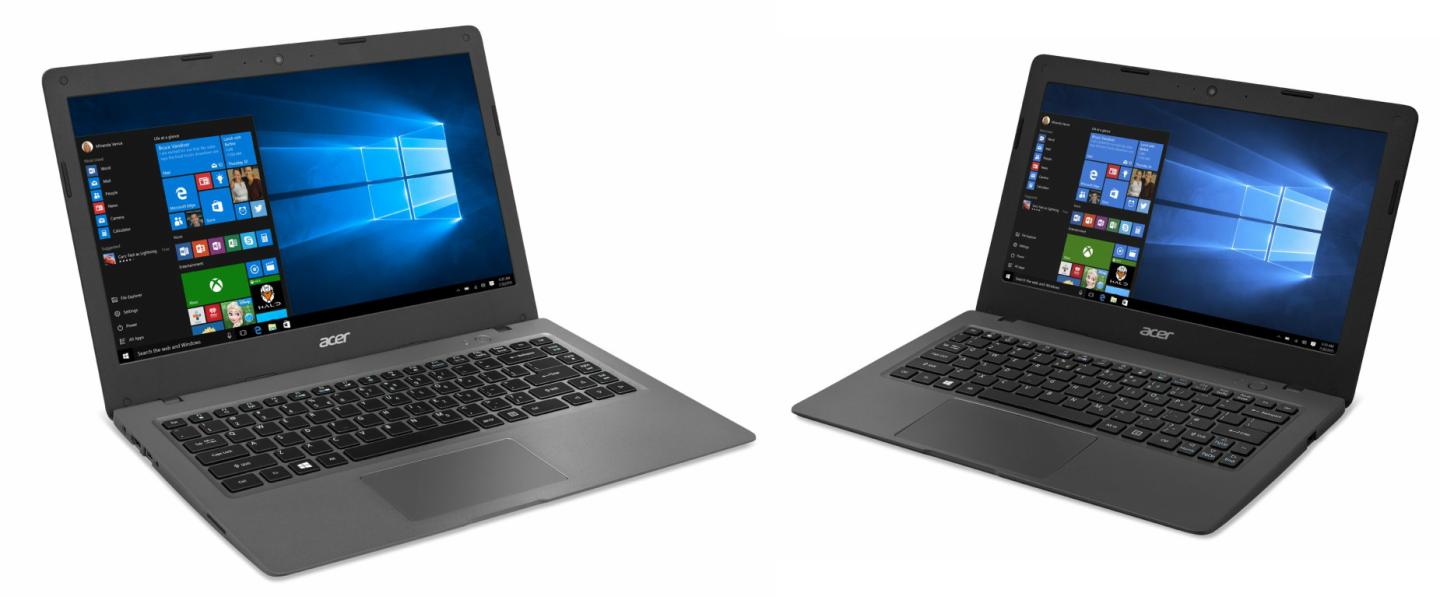
What kind of computing experience can you possibly expect from a $169 laptop? I tested both models—the 2.5-pound Cloudbook 11 and 3.5-pound Cloudbook 14—in Acer’s lineup. They’re virtually identical save for screen size (11.6 inches and 14 inches, respectively), boasting the same color, processor, features and storage configurations.
Both machines are covered in a textured, dull-gray plastic—a color I can’t say I find particularly appealing. They’re powered by an Intel Celeron N3050 dual-core processor and 2GB of RAM. The Cloudbook 11 comes with either 16GB or 32GB of storage ($170 and $190), while the Cloudbook 14 comes with 32GB or 64GB ($200 or $250). Both models provide an SD card slot (as well as two USB ports), so you can easily and inexpensively expand the available storage.
Both machines also incorporate a bright, LED-backlit display with a native resolution of 1,366 x 768. That pixel count suffices on an 11.6-inch screen, but the Cloudbook 14 looks a bit grainy. On the flip side, the latter machine affords a full-size keyboard, while the Cloudbook 11’s smaller form results in slightly cramped keys. Thankfully, both keyboards feel durable and responsive, and the Cloudbook 11 has the same admirably spacious touchpad as its bigger sibling.
Acer packed in a few other welcome amenities as well, including 802.11ac Wi-Fi, Bluetooth 4.0, stereo speakers that sound surprisingly decent, and an HDMI output for connecting to a TV or larger monitor. However, the big perk here is the one-year subscription to Microsoft Office 365 Personal, which otherwise would cost you $70. The license is good for not just your laptop, but also your tablet, phone, or other mobile device.
Now I must address the elephant in the room, and that’s performance. These machines have horse-and-buggy processors, and 2GB of RAM just isn’t enough for Windows to flex its muscles.
Or is it? I found startup time reasonably speedy—about 20 seconds in my informal stopwatch tests—and although some tasks felt sluggish, the system actually got faster the more I used it.
I can’t explain this except to think that when I first started my tests, perhaps Windows was in the process of updating and/or configuring itself. Once those machinations were done, there was less drag on the processor. In any case, I found that Microsoft’s Edge browser loaded almost instantly, even when I clicked it just seconds after Windows booted. I was also pleasantly surprised by the silky-smooth scrolling in Web pages under my two-fingered touchpad swipes.
That said, some tasks felt sluggish, especially if I attempted more than a few at a time. YouTube videos often stuttered for their first few seconds, and occasionally during playback. Sometimes browser clicks didn’t register for as long as 10 seconds. Finally, it took what seemed like an eternity to install Office 365: well over 20 minutes.
Of course, this is coming from someone accustomed to reasonably powerful machine, one equipped with an Intel Core i5 or i7 processor and lots of RAM. If you need a PC that’s just for a few basic tasks—word processing, Web browsing, and the like— you may not find the Cloudbook’s performance lacking.
While this is not the laptop to get if you need business-class horsepower, it’s a perfectly fine option for students and other users with minimalist needs. Heck, you could buy six decked-out Cloudbook 14s—each with Office 365—for the same price as one Office-not-included SurfaceBook. Looking at that math, I can’t help wondering why there’s so much fuss over the latter.
Sign up for Data Sheet, Fortune’s daily newsletter about the business of technology.
For more on laptops, check out the following Fortune video: