Meal planning apps are a powerful kitchen management tool, especially if you have limited time and a packed work calendar to contend with. These apps offer recipe libraries, customization, shopping lists, and more.
We worked with a registered nutrition coach to test and select the five best meal planning apps of the year to ensure that you and your family have consistent and healthy meals, no matter how busy life gets.
Best Meal Planning Apps of (2026)
- Best Meal Planning App Overall: Prepear
- Best Meal Planning App with Grocery Lists: Plan to Eat
- Best Meal Planning App for Weight Loss: Paprika
- Best Meal Planning App for Dietary Restrictions: Mealime
- Best Meal Planning App for Families: eMeals
Best Meal Planning Apps Comparison Table
Best Meal Planning App Overall: Prepear
Prepear
Price
Basic- free, Gold- $9.99/monthTypes of Diets Supported
Vegetarian, gluten-free, family-friendly, and moreCompatibility
Apple, Android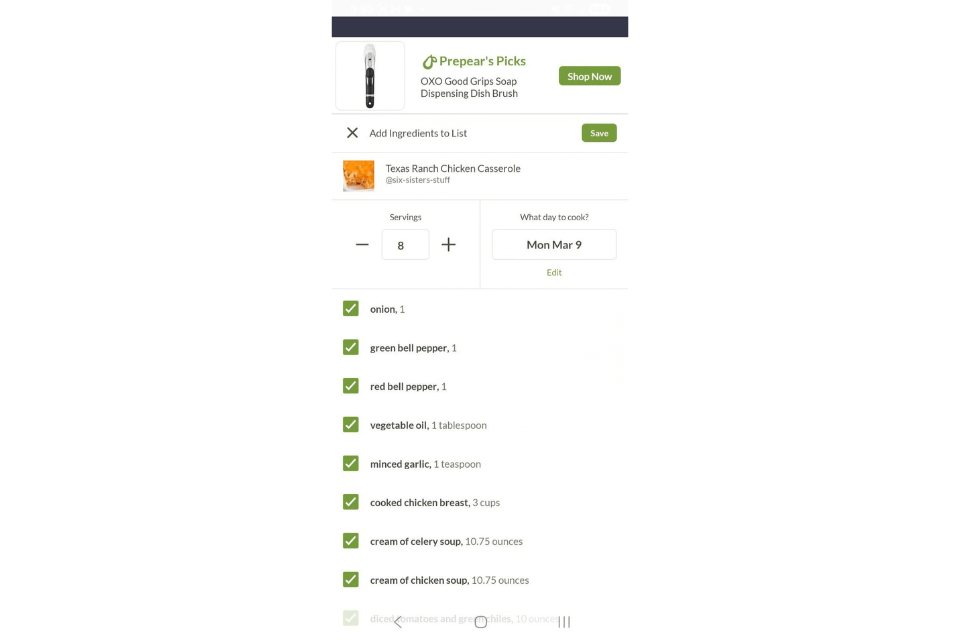
Great filter within the app (cuisine, special diets, allergies)
Folks who want a robust recipe database
- Smart grocery list that auto-sorts
- Drag and drop meal planner
- Free tier has extensive features
- Full content library is behind Gold paywall
- Not a full calorie/macro counter
- App may be too complex for some beginners
Our Thoughts on Prepear
Prepear is our pick for the best overall meal planning app because it runs like a true kitchen manager, which we think is perfect for busy professionals. You can save recipes and then quickly tap to add them to your weekly calendar. Then, the app creates a sorted grocery list for you. The smart grocery list can also sync with your grocery delivery or pickup. You can also import recipes from anywhere on the web—Prepear has unlimited recipe storage.
Pete tested Prepear, rating it a 5 out of 5 for the initial sign-up and getting started. “The app is simple and straightforward to sign up for. All you’ll need to do is create an account and then log into the app,” he said. “There was no survey, questions, or credit card information needed.” We think this simplicity really makes Prepear stand out.
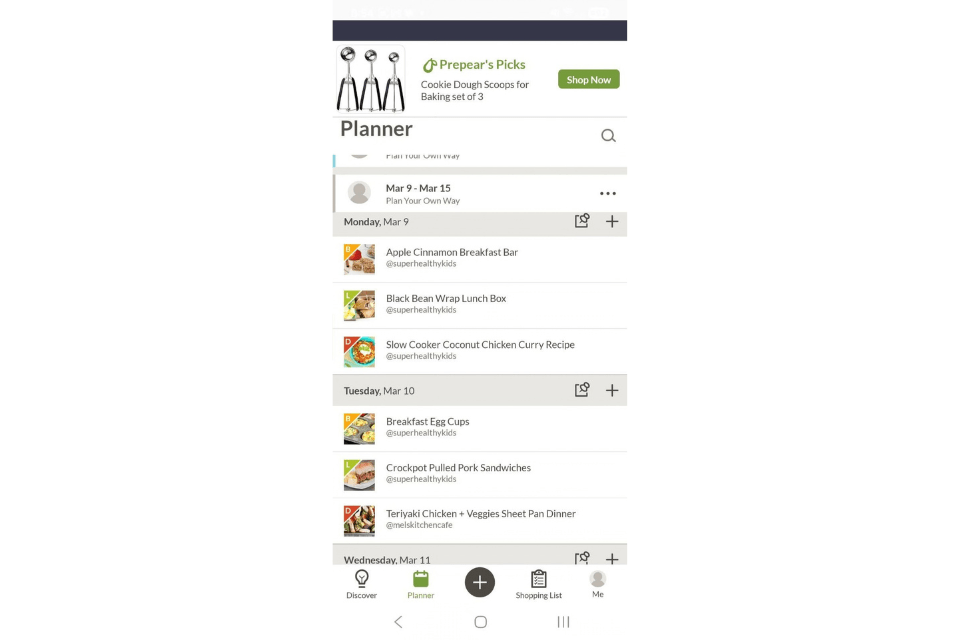
While the app doesn’t suggest meals, you can filter the recipes by meal type, cuisine, cook time, special diets, audience, and allergies. The app supports special diets like vegan, vegetarian, paleo, low-calorie, gluten-free, and dairy-free. Since you don’t input any personal information or answer a survey, the app doesn’t align to any particular goals.
When asked about customization, Pete noted that “you can’t customize or modify the recipes that are already included in the app. However, you are able to create your own recipes, which allows for full customization.” He rated personalization a 5 out of 5, as you can input and store your fridge/pantry inventory for easy recipe creation. Your shopping list will automatically adjust based on what you already have at home, which we love.
There is a pantry feature on the app, but it can be difficult to find. “If you’re in your shopping list, click on the three dots to the right of the Shopping List heading,” Pete wrote. “Then you can view options including ‘Print Shopping List’ and ‘View Pantry.’ Once you click on view pantry, you can add foods to your pantry list and the app will leave them off your future grocery lists. It works well, it’s just hard to find in the app so many users may miss it initially.”
Pete found the shopping list useful, rating it a 5 out of 5. “You can import ingredients into your shopping list straight from a recipe,” he noted. “There’s also a button at the bottom of the grocery list that says ‘shop my list.’ This connects to either Instacart or the Walmart app for easy shopping and delivery/pickup.”
Best Meal Planning App With Grocery Lists: Plan to Eat
Plan to Eat
Price
$54.99 per yearTypes of Diets Supported
Vegetarian, vegan, paleo, ketogenic, mediterranean, gluten-freeCompatibility
Apple, Android
We like the grocery list feature the best
Good for folks who need a better way to plan and shop
- Includes a helpful app tutorial
- Recipe customization feature
- Syncs well with a web version of the app
- No pantry feature
- Recipes can only be imported one at a time
- There are no base recipes in the app
Our Thoughts on Plan to Eat
Plan to Eat is our pick for the best meal planning app with a grocery list. The grocery list and shopping aspects are the best part of the app. You can import recipes from any website or add your own and then place them on the calendar, then Plan to Eat builds a grocery shopping list for you. It also allows you to assign grocery items to different grocery stores, which is how many folks shop (meat at one store, pantry staples at another).
Pete tested Plan to Eat, rating his sign up and initial experience with the app a 5 out of 5. “Setting up the account and logging in was extremely easy,” he said. “The app offers a free 14-day trial without having to put in any credit card information to get started,” he said. “Plan to Eat also allows you to sign in with existing profiles, such as your Google account, which makes the sign-in process a breeze.”
Plan to Eat has a tutorial during the sign-up process, which Pete loved. “The tutorial is brief, but helpful for figuring out what the app does and how to use it,” he said. When you open the app, it is nearly blank aside from three labeled tabs—cook, plan, and shop. “You’ll have to find recipes online and import them into the app,” he added. “You can save the recipes that you import based on the course, type of cuisine, main ingredient, or create your own custom tags.”
Our tester thinks that importing a lot of recipes into the app could be an involved process but could be something that you do slowly over time as you find recipes you enjoy.
“There are some slight issues though, especially when using the ‘shop’ feature,” Pete wrote. “This is a cool idea, because it basically compiles a grocery list based on the recipes you selected for the day or week. However, if multiple recipes use the same ingredient, instead of collating and adding up the amount of the ingredient, the ingredient will be shown multiple times on the grocery list. An example of this would be common seasonings like salt and pepper, which show up in almost every recipe.” Because of this, he rated the shopping list feature just a 2.5 out of 5.
Best Meal Planning App for Weight Loss: Paprika
Paprika
Price
$4.99Types of Diets Supported
Vegan, vegetarian, paleo, gluten-free, and moreCompatibility
Apple, Android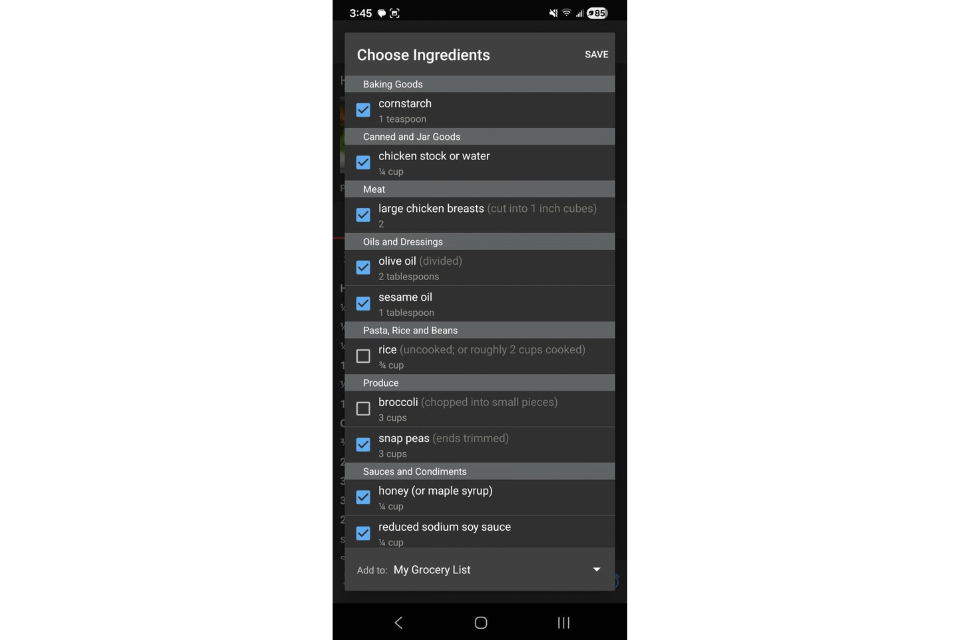
We love the customization this app offers
Folks who like auto-populating grocery lists
- App is a one-time purchase for only $4.99
- Smart grocery list has pantry integration
- Recipe organization is top notch
- The app does not come with a base set of recipes
- No calorie or macro tracking
- The desktop version is a separate purchase if you’d like it in addition to the app
Our Thoughts on Paprika
Paprika is our pick for the best meal planning app for weight loss because it encourages you to plan out your meals and integrate with your calendar, which helps to avoid last-minute takeout or unhealthy snack runs. You can also create reusable menus, which is great for repeating healthful meals that work well for your goals. Paprika allows you to save recipes from any website, which you can then tag as low-calorie, high-protein, for quick reference later.
Pete tested Paprika and found the app set-up to be seamless. “All you need to do is download the app, and you’re able to get right in. There is no login process or any type of quiz you need to complete to get started,” he said, rating it a 5 out of 5 for setup and getting started.

There was not a tutorial when starting the app, but there is a guide for recipe import. “You just head into the different menu sections and explore the app,” Pete said. “On their browser section page, there is a ‘getting started’ section that explains and shows how you can download recipes into the app.”
The app does not suggest recipes based on your meal preferences, rather, you create or import recipes from the web yourself. Paprika supports many special diets such as dairy-free, gluten-free, low-calorie, paleo, keto, vegan, and vegetarian.
All of the recipes are customizable, as you are either importing them from a website or typing them in on your own. There aren’t any base recipes included in the app. That being said, Pete found it easy to add specific items to his pantry in the app.
Pete rated the shopping list feature a 5 out of 5. “The shopping list was extremely helpful,” he said. “I liked that you could easily import the ingredients from a recipe directly into the grocery list.” You can also sync the app with your calendar for planning purposes.
Being able to add, import, and fully customize recipes is a great feature. “I also loved that the smart grocery list considered the ingredients that I already have in my pantry,” Pete said. “Instead of leaving them off the shopping list entirely, they were simply unchecked, showing that I already had those ingredients in stock. It did give me the ability to re-check those ingredients if I wanted to shop for more of them, if desired.”
Looking to save even more time? Check out our list of the best meal delivery services for weight loss.
Best Meal Planning App for Dietary Restrictions: Mealime
Mealime
Price
Basic- free, Pro- $2.99Types of Diets Supported
Low carb, keto, flexitarian, paleo, vegetarian, pescatarian, veganCompatibility
Apple, Android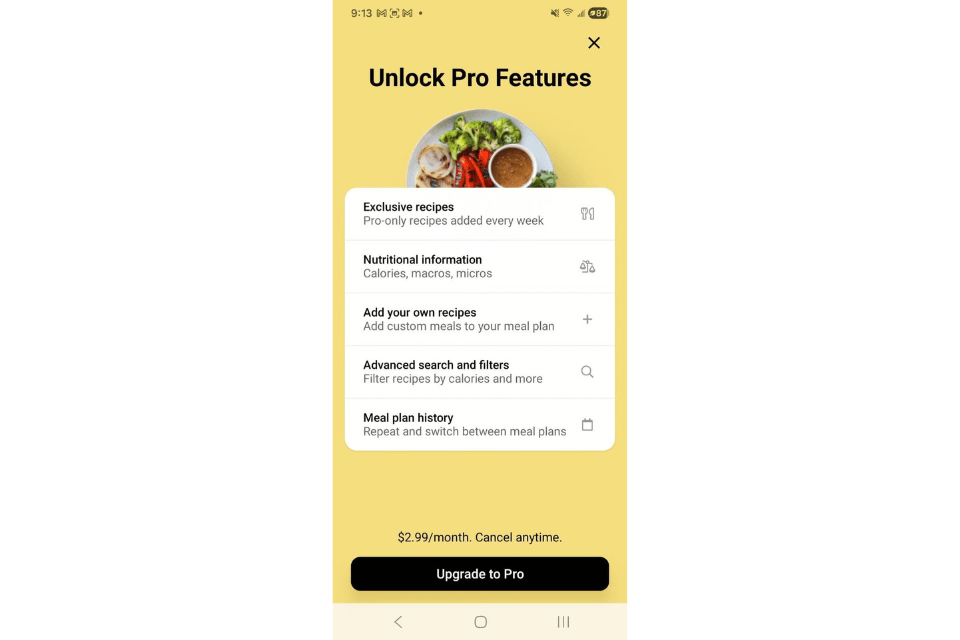
Our tester loved how quickly the app builds a week’s worth of meals
Those who have food intolerance, allergies, and ingredients they’d prefer to avoid
- Customizable diets and allergy filters
- Free app, pro upgrade is affordable
- In-app calendar feature is great for weekly meal plans
- Free version has limited nutrition data
- Grocery list is difficult to customize
- Focused more on dinner than other meals
Our Thoughts on Mealime
Mealime is our pick for the best meal planning app for dietary restrictions because not only does it support specialty diets like paleo, vegan, and vegetarian, but the app also has extensive filtering for allergens like gluten‑free, shellfish‑free, fish‑free, dairy‑free, peanut‑free, tree‑nut‑free, soy‑free, egg‑free, sesame‑free, and mustard‑free. You can also ask the app to avoid a hundred or so ingredients (perfect for picky eaters), which is a great way to customize your meals.
Pete tested Mealime, rating the sign-up and starting process as a 4.5 out of 5. “It took less than two minutes from the time the app was done downloading for me to being able to use the full app. There are a few questions to answer before logging in, but it’s extremely quick and does help customize the app to your needs,” he said. “The questions were about the types of food you like and dislike, and if you have any allergies or food intolerances.”
Based on the diet plan you select (ranging from classic to flexitarian), the app will suggest meals that align with your choice.
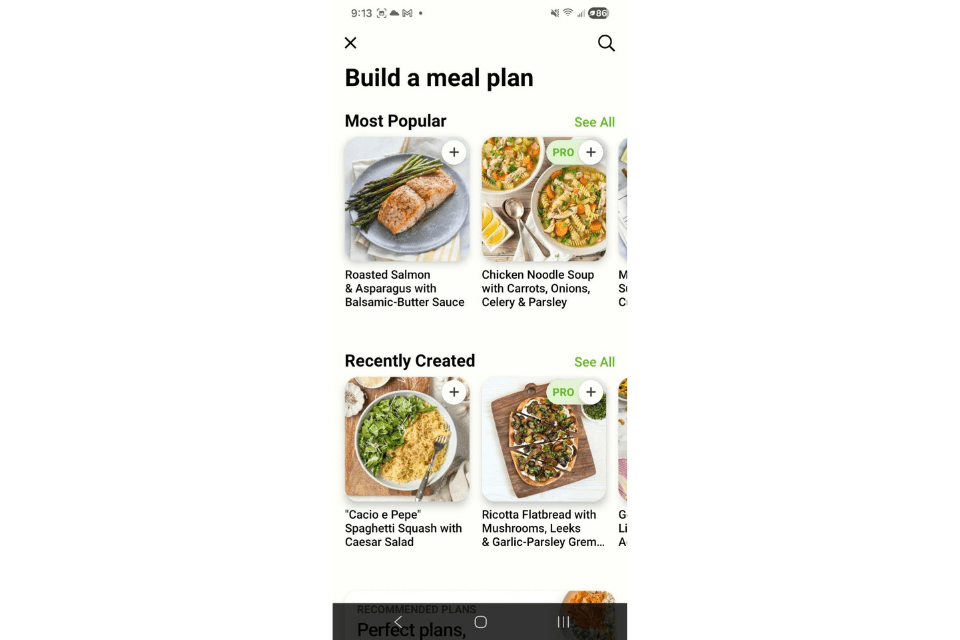
Our tester noticed that Mealime’s grocery list is a bit different from the other apps on our list. “The shopping list is helpful in the sense that it pulls automatically from the meal plan you’ve selected,” Pete said. “However, there’s no way to customize the grocery list itself or quickly edit items already on the list. For example, if your grocery list had two apples on it, you can’t easily change it to three. You’d have to click on the plus (+) button, then type in apple, and then add it to the list.” Because of this, he rated the shopping list feature a 3 out of 5.
Pete would use this app regularly, and recommends it for someone who struggles to decide what to cook each night. “This app makes it extremely simple to find recipes, create a meal plan for the week, and make an easy-to-follow grocery list,” he said.
“The coolest feature of Mealime is the ability to build your own meal plan each week,” Pete added. “From the recipe database, you can select meals from a variety of categories such as ‘most popular,’ ‘top rated,’ ‘super simple,’ and more. Once you select the meals you’d like to have in your plan, hit ‘build plan’ and the app imports all of the ingredients that you need directly into the grocery list.”
Best Meal Planning App for Families: eMeals
eMeals
Price
$4.99 per monthTypes of Diets Supported
More than 15 optionsCompatibility
Apple, Android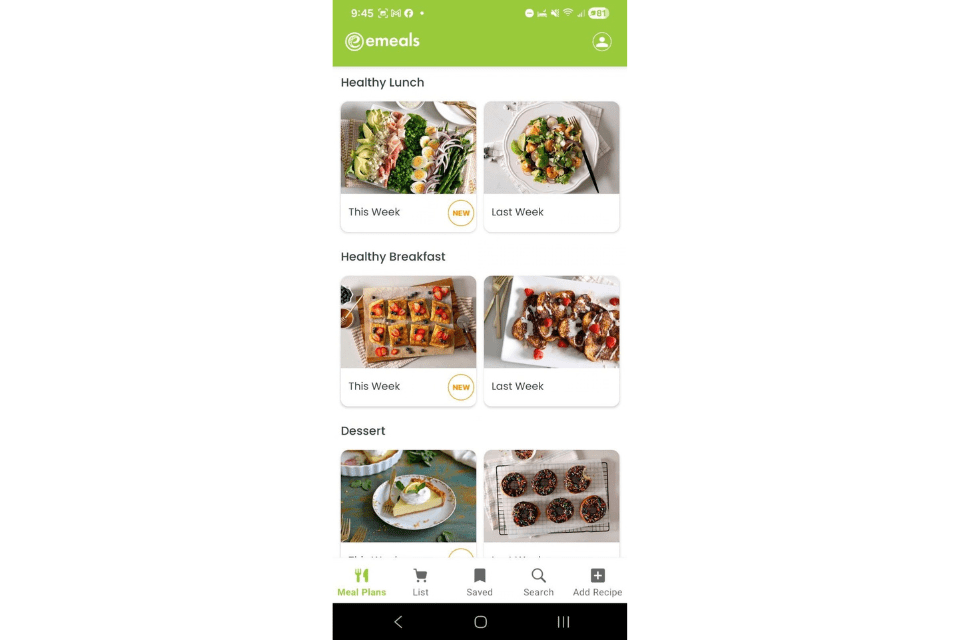
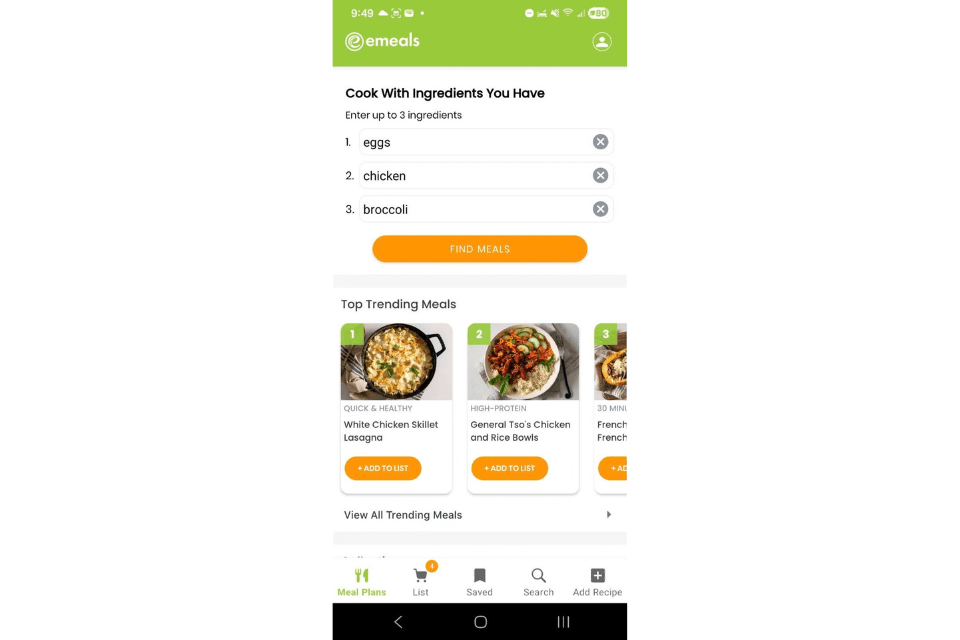
We love the “Cook with the ingredients you have” feature
Those who like a longer free trial (this one is two weeks)
- Kid-friendly recipes and family portions
- Nice variety of diet specializations
- Has seasonal and special occasion menus
- UX could be better – it can be tricky to go “back” in the app without closing out
- Subscription required, no lifetime purchase available
- Can’t modify the base recipes
Our Thoughts on eMeals
eMeals is our pick for the best meal planning app for families because you get to customize your plan from the very start: pick from family-friendly, quick and healthy, budget, low-carb, and more to suit the needs of your family. The app is also connected to grocery shopping apps like Walmart, Kroger, Instacart, or Amazon for ease of ordering and delivery or pickup.
Pete tested eMeals, rating the sign-up and setup process a 3 out of 5. “When signing up, there were a few questions you had to answer about your lifestyle and goals, and then you had to sign up with a credit card to access the app. It does offer a 14-day free trial to test out the app, and then the annual price is $59.99,” Pete said.
The app questionnaire asked about dietary preferences, allergies, the number of people you’d be cooking for, and how many days a week you were planning to cook. Then the app suggests meals based on your diet preferences, which is a nice feature that not all the apps on our list offer.
Pete rated the shopping list a 4 out of 5. “This feature worked great–once you select your meal plan for the week, the ingredients automatically import into your grocery list. There’s also an easy way to add additional ingredients to your list,” he said.
That said, our tester noted one area where the app leaves just a little to be desired: “I do think the overall UX of the app could be improved slightly,” Pete said. “There are screens where there aren’t any back buttons, so a few times, I had to leave the app and start over to get where I wanted to go.”
Still, Pete thinks the app’s features overall provide fantastic value for the price. “One of the coolest features is the ‘cook with ingredients you have,’ which allows you to enter ingredients that you already have in your house, and eMeals will find recipes that contain those ingredients,” he said. “This feature makes meal planning very simple, especially for a busy family that doesn’t have time to get to the grocery store and is working with what they have on hand.”
Want to try a meal delivery service for your family? Check out our top picks.
How We Tested and Selected the Best Meal Planning Apps
We tested multiple meal planning apps, considering their set up, UX/UI, customization, recipe library, shopping list features, and more. Here are some more details on how tested these categories.
Set Up
Our tester rated the sign-up and set up process for each meal planning app, rating them on a 1 to 5 scale for how easy it was, then giving an explanation of their rating. If a tutorial was offered on how to use the app, the tester also described if it was helpful and useful.

User Interface
Our testers provided feedback on the user interface, sharing how easy or difficult it was to navigate the app, find the tools they needed, and more.
Customization
We looked at how detailed the customization of each app was for dietary needs, creating an inventory of your pantry and fridge, and if it was easily customizable for families, special diets, allergies, and more.
Recipe library
We also looked for apps with extensive recipe libraries already built into the app at the time of download, which helped to make meal planning and shopping much easier.
How to Find the Best Meal Planning App for You
Selecting the best meal planning app for you will depend on what you’d like to use it for: recipe library, recipe creation, shopping list, timing, and more. Here are some aspects to consider when choosing the best meal planning app for you.
Your Goals
Your goal might be to eat in a certain way (high-protein, keto, and more) or for weight loss. Most meal planning apps have filters and meal customization features that can help guide you on your way to meeting your health goals.
Dietary Needs
It’s best to look for features that meet your dietary needs, such as an app that filters for allergens or special diets, or a goal of eating high protein foods or less calories.
Cost
Many meal planning apps are free to use, or free for a trial period ahead of a full subscription or lifetime purchase. Keep your budget in mind when selecting a meal planning app.
Benefits of Meal Planning Apps
Meal planning apps can help you manage your kitchen and support you through planning, shopping, and cooking your meals. Here are some benefits to using a meal planning app:
- Save time and energy: Let the app plan for you! You can often align your own pantry and fridge inventory with the app, that way it will plan meals with ingredients that you already have on hand.
- Eat healthier: Your meal planning app can ensure that you have seven days worth of meals planned ahead so that you can stay on track with your dietary goals.
- Reduce waste and be more sustainable: Using a meal planning app can help you avoid excessive food waste, food that goes bad, and overspending.
- Eliminate stress around meal time: For families and busy professionals, using an app to plan your meals can reduce decision fatigue and stress around what to eat
What to Avoid in Meal Planning Apps
Not every meal planning app for work for every household–here’s what to avoid:
- Apps that make it difficult to export or customize your grocery list.
- Apps without any base recipes, if you’d like the app to provide ideas for you.
- Apps that hide important features behind a paywall or high subscription price.
Frequently asked questions
What is the best meal planner app?
Prepear is our pick for the best overall meal planning app because it runs like a true kitchen manager, which we think is perfect for busy professionals. You can save recipes and then quickly tap to add them to your weekly calendar. Then, the app creates a sorted grocery list for you. The smart grocery list can also sync with your grocery delivery or pickup. You can also import recipes from anywhere on the web—Prepear offers unlimited recipe storage.
Is a free meal planning app worth it?
Yes, it definitely can be. There are plenty of free meal planning apps that can be a helpful kitchen tool by providing recipe libraries, custom recipe creation and import, shopping lists, and more.
Can you personalize your meal planning app?
Yes, the meal planning apps that we tested allow you to create and customize your own recipes within the apps.