Calorie counting has come a long way. People used to have to look up individual items’ caloric content and write it down on paper, but apps have changed that. Now it’s relatively easy to keep a food log in your phone and tally calories throughout the day.
So, what’s the best calorie counter app? There isn’t one right answer for everyone, as it depends on your goals—whether weight loss, mindful eating, macro tracking, or something else—and how much additional support or education you’re seeking in an app.
For the busy professional committed to managing callories in a healthy way while maintining a packed work schedule, the right calorie counter app can be a game changer. Here are some of our favorites.
Best Calorie Counter Apps of 2026
- Best Calorie Counter App Overall: Noom
- Best Free Calorie Counter App: Cronometer
- Best Calorie Counter App with Meal Planning: Weight Watchers
- Best Calorie and Macro Counter App: MyFitnessPal
- Best Calorie Counter App for Weight Loss: Yazio
Best Calorie Counter Apps Comparison Table
Best Calorie Counter App Overall: Noom
Noom
| Fortune score | 4/5 |

at Noom
- Our thoughts: Our testers loved the color-coded system and built-in support
- Who it’s for: People who want more support as they count calories
- What makes it different: They incorporate lessons on behavior psychology to help people reach their goals
Pros
- Color‑coded system for calorie guidance
- Daily mini lessons for additional support
- No foods considered off limits
Cons
- Some foods must be added manually
- Recommended calorie targets may seem low
- No meal plan available
Our Thoughts on Noom
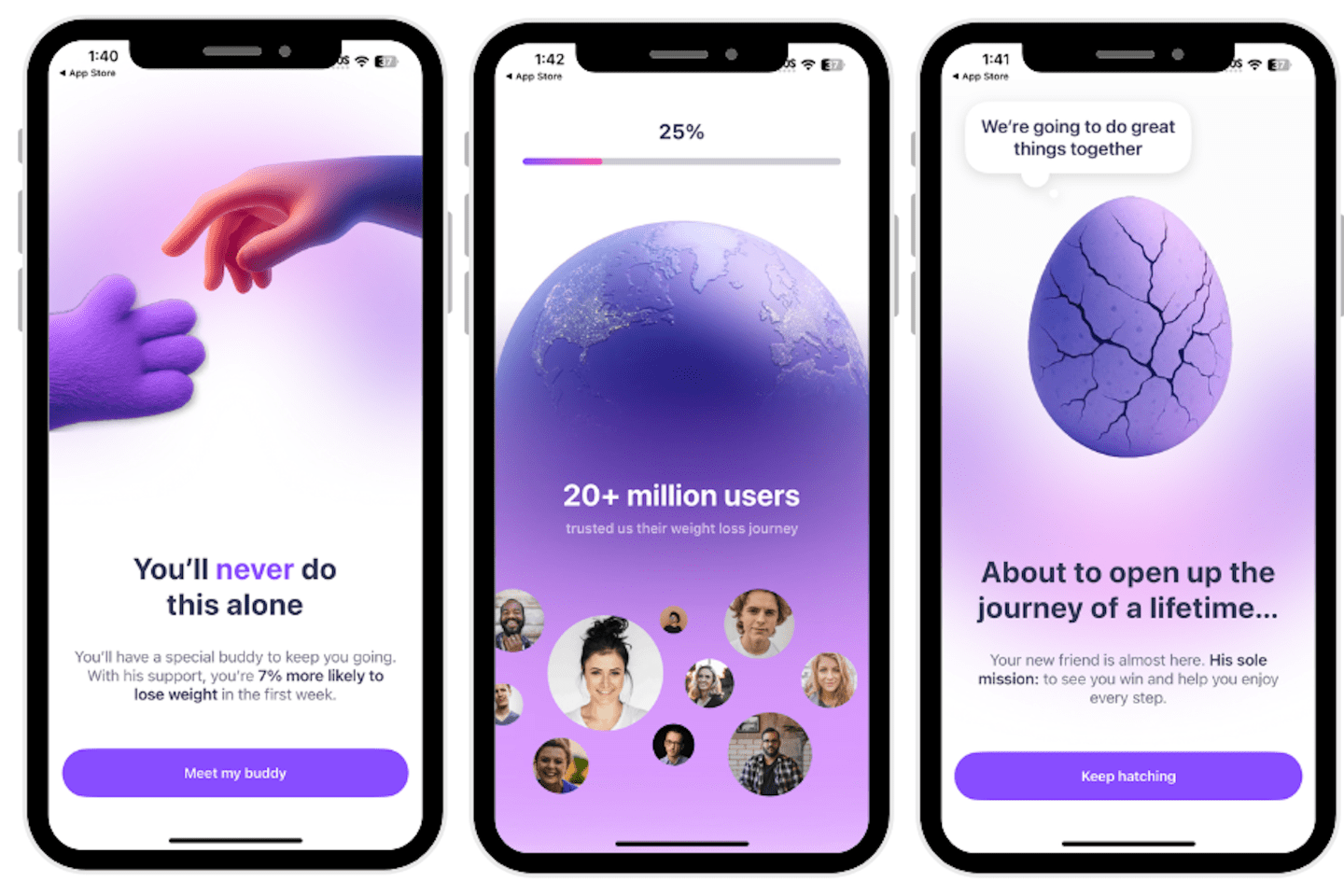
Noom frames their app as a science-based way to facilitate long-term weight loss. Noom offers educational support designed to help people discover the “why” behind their behaviors—which in turn can help people change. We asked two testers to try the Noom app, and both gave rave reviews. Here’s what they said.
First, the app’s general approach to calorie-counting was simple, according to our tester Grant. “It centers around replacing wasteful calories with other—more filling—foods that can help you lose weight overall,” he said. “The goal is simple: Stay at a calorie deficit—lose weight. While that’s not necessarily true for everybody in every circumstance, it worked for me and was simple enough to stick to.” Grant rated it a 5 out of 5 for safety.

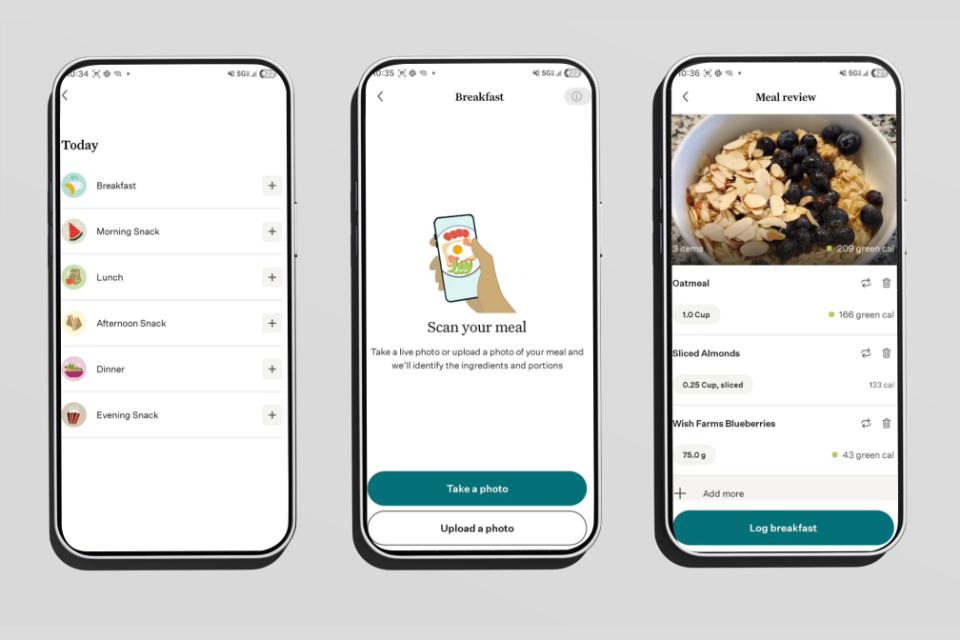
Noom does this with a simple color-coded system that assigns foods one of three colors: green, yellow, or orange. Pete, our second tester, said higher-calorie foods are orange, while lower-calorie foods are green. Pete awarded the app a 5 out of 5 for its instructions. Pete also said this gentle guidance was an appealing aspect of using Noom, because no foods were truly off limits. For that reason, he said, it felt less intimidating. Pete did notice, though, that the calorie recommendations sometimes seemed low for a physically active person.
One of the best parts of using Noom was the support and education built into the app. “There was personalized support for free (after paying for the subscription) that could be used, as well as active dieticians in the community groups answering common questions daily,” Grant said. Pete, meanwhile, appreciated the daily mini lessons. He noted that the lessons are rooted in behavioral science and can help people understand why they eat the way they do, plus identify potential food triggers and build healthy habits.
Overall, our testers enjoyed using Noom and found it a helpful tool for tracking calories. Grant said, “Noom helped me lose nearly 70 pounds. It wasn’t just Noom, but the first 24 pounds I lost I attribute to Noom directly—understanding where I was getting more calories than needed was the first step in cleaning up my diet (which felt like a game honestly).” He awarded it a 5 out of 5 for overall experience.
Best Free Calorie Counter App: Cronometer
Cronometer
| Fortune score | 4/5 |

at Cronometer
- Our thoughts: We liked its simple functionality and it had a great free version
- Who it’s for: People who just need a tracker, not any additional support or education
- What makes it different: It’s a tool for people with clearly defined calorie or macronutrient goals, versus a one-stop shop that helps you set goals and track progress toward them.
Pros
- Free version has barcode scanning
- Customize calorie and macro targets
- Quick onboarding process
Cons
- Lacks educational content
- No accountability features
- Fewer frills overall
Our Thoughts on Cronometer
Cronometer is designed to give people personalized insight into their health data, which includes helping people monitor food intake with food journaling. The company even allows users to track vitamins and minerals, not just calories.
Our tester, Pete, has used Cronometer intermittently for six years. As Pete said, “It’s not something I use year-round, but it’s a tool I add into my routine when I’m preparing for a competition or when I want to be more intentional about my eating habits.”
One thing Pete liked right away was the easy onboarding. “Getting set up with Cronometer is simple. There’s no lengthy onboarding quiz,” he said. After that, the app really is all about tracking. “The app makes it easy to log food and track both calories and macronutrients,” he described. “I appreciate that it also tracks other important metrics like fiber and a few different vitamins and minerals.” He awarded it a 4 out of 5 for an overall positive experience.
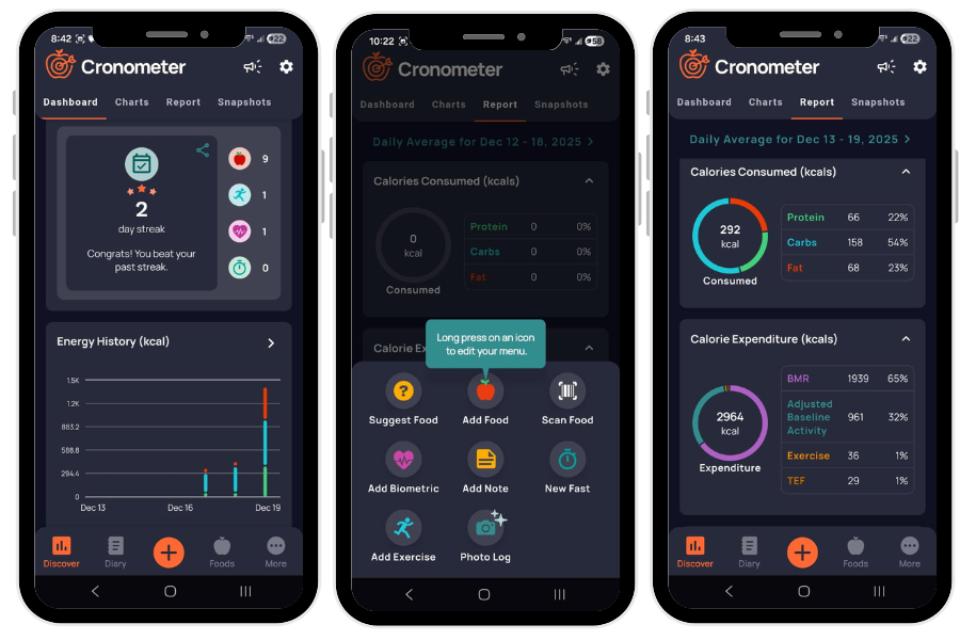
It’s important to note that overall, the app has fewer frills than others by design. Pete said, “Cronometer is really just a tracking-focused app designed to help you log food, exercise, and body weight.” This may be appealing to some, but a drawback to others—it really depends on the amount of support you’re looking for. Even the free version offers a lot of functionality, Pete added, including the barcode scanning feature, while noting that the paid version adds helpful tools like personalized food suggestions, a fasting timer, and a feature that makes it easier to log home-cooked meals by pasting the recipe URL.
Another thing we appreciated about the app is that it’s customizable—users can set precise calorie and macronutrient targets for themselves. But overall, said Pete, “This isn’t an accountability app.” He rated it a 1 out of 5 for accountability.
Cronometer is a straightforward tracking app that our tester said was very easy to understand and use from a logistical standpoint, and something that could be a useful ongoing tool. He awarded it a 4 out of 5 for sustainability.
Best Calorie Counter App with Meal Planning: Weight Watchers
WeightWatchers
| Fortune score | 4/5 |

at WeightWatchers
- Our thoughts: Our tester liked the points system and abundant features
- Who it’s for: People who don’t want to count calories
- What makes it different: Instead of tallying calories, Weight Watchers has an easy-to-use points system.
Pros
- Food points make for easy calorie tracking
- Tons of support options
- Excellent for accountability
Cons
- ZeroPoints label may be confusing
- Tracks points instead of calories
- Lacking in nutrition education
Our Thoughts on Weight Watchers
Most people have probably heard of Weight Watchers, which has been around since the 1960s. Support and accountability were integral to the program—with the idea that meetings would help people stay on track for meeting their health goals—and decades later those things are key features of the Weight Watchers app.
Pete used the Weight Watchers app for a week and gave it positive marks overall. He said, “The food point system is approachable and works well for people who don’t want the hassle of tracking calories or macros,” awarding the app a 4 out of 5 for its instructions.
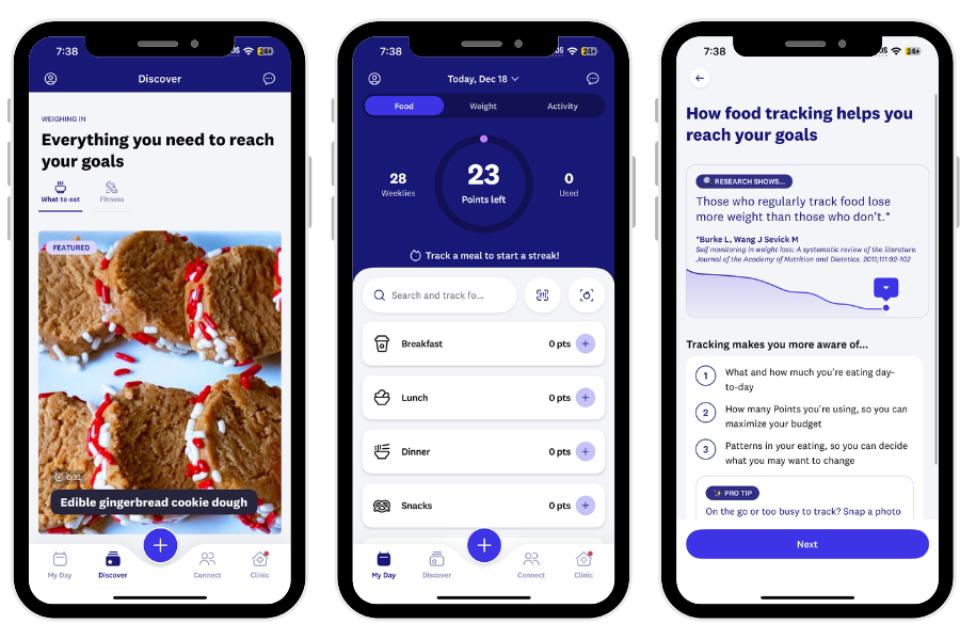
After onboarding, the app created a “points budget” which tells users how many points they can consume in a given day. The app offers a lot of additional features to help people track their meals and snacks, including a barcode scanner and the ability to log meals. Pete felt the approach was sound, giving the app a 5 out of 5 for safety. On the topic of points, he did note that there might be confusion about “ZeroPoint” foods, because those aren’t actually calorie-free foods.
The Weight Watchers app really shines when it comes to the abundance of support options. “The app’s educational components help users build healthier habits by combining expert-led coaching, behavioral science, and practical nutrition tools,” Pete said, noting there are interactive workshops and recipe analysis that help people make better choices.
Community support is another key feature of the Weight Watchers app. Pete said Weight Watchers hosts regular meetings for people to share their weight loss journeys, with the idea that social support can help people stick to their goals and achieve better long-term results.
Pete found the app to be straightforward and effective, saying, “I found the WW points system fairly easy to understand and generally simple to follow.” He rated it a 4 out of 5 for a great overall experience.
Best Calorie and Macro Counter App: MyFitnessPal
MyFitnessPal
| Fortune score | 4/5 |

at MyFitnessPal
- Our thoughts: We liked this straightforward, pared-down tracking app
- Who it’s for: Those who primarily want a tracking function
- What makes it different: Get access to a recipe database and workout videos with the paid version.
Pros
- Robust recipe database
- Access to community groups
- Easy calorie tracking
Cons
- Not much educational support
- Barcode scanner no longer in free version
- Focus on numbers can feel overwhelming
Our Thoughts on MyFitnessPal
MyFitnessPal is a top nutrition app that offers classic tracking capabilities. Besides calories, the app also allows users to track macros, vitamins, and other micronutrients. The premium version comes with access to additional tools like barcode scanning plus the option to customize macro goals.
Our tester, Pete, has a lot of experience with this app. He said, “I’ve used the MyFitnessPal app on and off for the past 10 years. When I’m being very strict with my diet and following set calorie and macronutrient goals, I use this app to help keep me on track.” That’s because this app aims to help people understand how many calories are in the foods that they eat, though there isn’t any educational nutrition content about things like healthy food habits. It’s really all about the tracking. Pete did appreciate the simple-to-navigate interface, which he rated a 4 out of 5. Because instructions weren’t overly descriptive, he rated them a 2 out of 5.
MyFitnessPal does allow access to some community groups, basically topic-based forums focused on things like weight loss, fitness, and healthy habits, says Pete, but there isn’t any structured coaching from certified nutrition coaches or registered dietitians.
Pete did identify a couple of drawbacks, saying, “The app is mostly neutral and can even feel motivating as you see your progress, though the focus on numbers may feel overwhelming for some people.” Additionally, he said, “I wish the barcode scanner was still a free base feature, but overall the app is intuitive and easy to use.”
In general, though, Pete found MyFitnessPal straightforward and easy to use, with quick setup. He also said logging food was fast, and daily calories are always visible which made it easy to remain aware of daily intake. And he reported that logging food and seeing everything laid out clearly helped him stay aware of what he was eating without feeling overly restricted. Pete awarded this app a 4 out of 5 for overall experience.
Best Calorie Counter App for Weight Loss: Yazio
Yazio
| Fortune score | 4/5 |

at Yazio
- Our thoughts: Our tester praised its tracking ability and customization
- Who it’s for: Those seeking a simple tracking app that logs macros as well
- What makes it different: This app offers a “countdown” design showing how many calories you have left for the day.
Pros
- Straightforward tracking
- Customizable goals
- Simultaneously tracks macronutrients
Cons
- Countdown design might add pressure
- No educational features
- Instructions not as clear
Our Thoughts on Yazio
The Yazio app markets itself as an all-in-one food, fitness, and fasting tracker. For our testing we focused on the food tracking features, which can be used via the app’s calorie-intake calculator.
This calculator gives users three key numbers: calories eaten, calories burned, and calories remaining for the day. Below that users will see a macronutrient breakdown, showing daily allowances for carbs, protein, and fat, as well as how many grams of each you’re consumed so far.
Pete tried the free version of Yazio for one week, tracking calories and macronutrients. “The app was intuitive to use, and overall I had a positive experience. It did exactly what I needed it to do,” he said, rating it a 4 out of 5 for overall experience.

First Pete answered a quiz, after which the app generated goals for him—calorie and macronutrient targets. These can also be adjusted if desired. Pete appreciated the app’s interface, giving it a 4 out of 5. He rated the instructions a 2 out of 5, though, indicating they weren’t as thorough as he’d have liked.
Similar to other apps that focus primarily on tracking, Yazio doesn’t offer educational features. Yazio also doesn’t include community features or personalized coaching, as some more feature-rich apps do. The “pro” version of the app does offer features like personalized meal recommendations and recipes, however, plus a food rating system with nutritional analysis.
We found this to be a helpful calorie counter app overall, with the option to upgrade for access to premium features.
How We Tested and Selected the Best Calorie Counter Apps
With so many different calorie counter apps out there, we wanted to select specific criteria to narrow down the options in our testing lineup. Here are the things we consider most important in this kind of app:
Setup and Ease of Use
We looked for apps with clear, simple onboarding so that the signup process would be smooth and efficient, and allow users to immediately start using the app.
Accountability
When it comes to features, we wanted to find an app that offered some mechanism to promote accountability so that users would be more likely to continue using the app.
Tracking Instructions
We wanted more than a straightforward calorie counter, so we included apps that also offered healthy guidance based on our data.
Sustainability
We prioritized apps that were conducive to long-term sustainability. We weren’t looking for programs that offered quick fixes or rapid weight loss, but instead offered steady, sustainable progress.
Value
When it comes to value, we were focused on a few keys things: Whether there was a free trial period or free version of the app, plan costs, and operating-system compatibility.
How to Find the Best Calorie Counter App for You
When choosing an app to track caloric intake, here are some key things to consider.
Your Personal Goals
Everyone has different preferences when it comes to interacting with apps. Some people want a lot of interaction throughout the day, and others prefer a more minimal approach. When choosing the best calorie counter app for you, make sure to consider your own preferences.
Accountability
No one needs their calorie counter app to nag them, but some people do want a nudge here and there. When selecting the best calorie counter app for yourself, think about where you fall on that spectrum. If an app isn’t a good match for your personal preferences, it could feel annoying to use.
Instructions
To rate instructions, we considered whether they were presented in a way that is easy to understand, and whether they were sufficiently thorough.
Cost
We included apps that offer free basic plans or free trials, as we know price matters. For people interested in additional features, many of the apps we reviewed offer membership tiers that unlock more advanced tracking options.
Benefits of Calorie Counter Apps
Calorie counter apps can be a convenient way to keep an eye on your daily intake. Here are a few other benefits to consider.
- Convenience: Once upon a time people were responsible for tracking calories themselves—it’s not uncommon for people to recall exact calorie counts for common foods, because they had to do the math themselves. But no more. Calorie counter apps makes it so much easier to track calories with just your phone.
- Mindfulness: As any nutrition researcher will tell you, people are notoriously bad at remembering what they ate, even if it was earlier that same day. With a calorie counter app you can immediately make notes, which shows you a true picture of what and how much you’re consuming. From there you can start to make changes.
- Trend identification: A distinct advantage of using an app is that some will identify trends. Constantly eating a large snack in the afternoon? You might not be eating a big enough lunch. Many apps offer built-in analytics that offer more precise recommendations to help you reach your goals.
Frequently asked questions
What is the most accurate calorie counter app?
We didn’t encounter any issues with accuracy while testing these apps. The most important factor is remembering to input all of your meals and snacks. Forgetting to add a meal or snack to your daily food log could significantly affect the data accuracy.
Is it bad to use a calorie counter app?
On the contrary—calorie counter apps are excellent tools for those who benefit from the increased awareness that tracking provides. Many people cannot accurately recall what they ate in a given day, so calorie counter apps provide an accurate record and sense of accountability that can facilitate behavior change.
Can I use a calorie counter app with a smartwatch?
Yes, many apps can be paired with a smartwatch or other wearable (like the Oura Ring). This information can typically be found on the app’s website, or by contacting customer service.