Most people are getting just a trickle of the high-speed Internet they are paying for. And most people have only themselves to blame. How do I know this? Even though I’m a tech columnist, until this month, I was most people.
Over the past four years, I’ve jerry-rigged a Wi-Fi setup in my home to push my Internet from its point-of-entry in my house — a cable modem buried down in my basement — all the way to my garage on the other side of the property. Using a 2013-era Apple Airport Extreme connected wirelessly to a 2007-era Extreme, I was lucky to reach all my various connected gear and get a 30mbps connection on my work computer – far slower than the 200mbps I was paying for.
Because I’ve got all sorts of connected devices throughout my home, my data demands are probably greater than yours. But that won’t be true for long. Almost one-third of homes will have some sort of connected gear this year, according to one estimate, a figure that will nearly double by 2021. These gadgets all gobble up data, so connecting them to an old Wi-Fi router could cripple your home network. The Apple Airport Extremes (AAPL) I was using, just like the wireless hubs given to subscribers by Internet providers, were designed for people carrying their laptop from one room to the next while staying online. They weren’t meant to sustain a totally connected home with modern data needs.
Get Data Sheet, Fortune’s technology newsletter.
How do you keep all your gadgets running at top-notch speed? The secret is a new generation of Wi-Fi routers built around “mesh” technology. With a mesh setup, you place a number of hotspots throughout your home (often three), extending your Internet signal’s reach without degrading its signal. So, rather than your smartphone grabbing video from a router downstairs and across your house, it’s getting a connection from a closer device, giving you a much stronger, speedier signal. And even if you’re not overloading your home network with lots of devices, buying your own modem and router can result in significantly faster speeds compared to using the models provided by your Internet company.
So which Wi-Fi mesh setups should you consider? I exhaustively tested five popular options over the past month. Here’s what it was like to use them.
Google Wifi
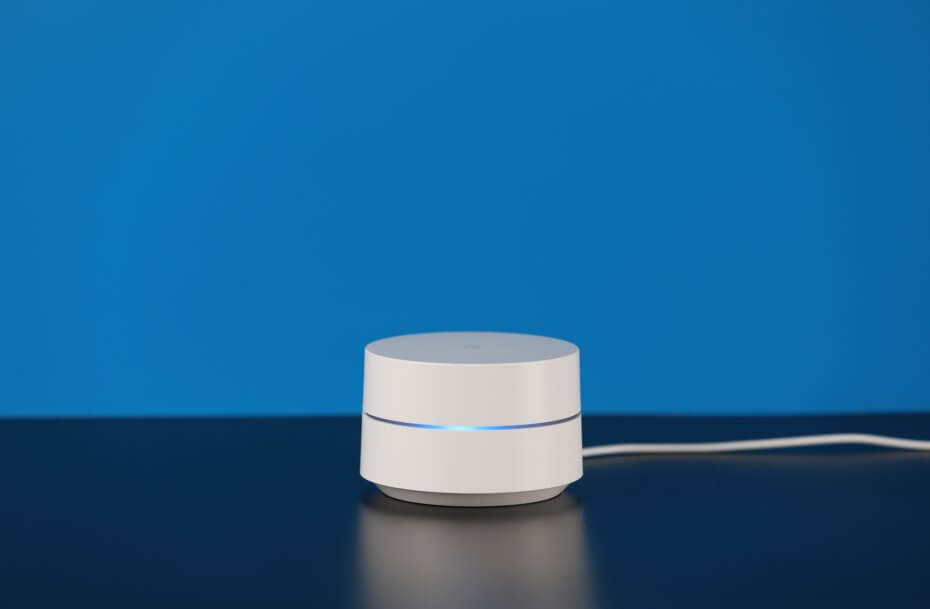
Google’s latest foray into home networking hardware, the Google Wifi array uses three routers to blanket up to 4,500 square feet in both 2.4Ghz- and 5Ghz-band Internet signals. Coupled with a useful app, it proved to be a good solution for both set-it-and-forget-it users as well as power networkers.
The only problem I experienced using Google Wifi (GOOGL) came shortly after taking it out of the box. The router that connected to my modem wasn’t registering the Internet connection. After 30 minutes of head-scratching along with a techie on Google’s support hotline, we finally made it work without a hitch. And I immediately saw screaming fast results, getting 130mbps speeds right next to the router. As I ventured through my home, the levels dropped to a still-solid 60mbps. My backyard was still a trouble spot, likely because it’s tough for wireless signals to get through my thick walls.
The Google Wifi hardware itself is relatively inoffensive. Svelte white cylinders about the size of a coffee can, they’re designed to blend into the background. You’d probably be forgiven if you mistook them for a lovely smokeless ashtray.
But the app is the real star here, with Google’s software clearly outperforming its competition. Easy-to-navigate tabs let even inexperienced networkers understand the makeup of their home’s data infrastructure. A “network check” feature can give you a quick speed test at the source, while other options like guest and family Wi-Fi help share your connection with others. My favorite feature is the “priority device” option, which lets you give one of your gadgets more bandwidth to do its thing. Unfortunately, Google’s settings don’t let you permanently prioritize a device, a feature present on rival devices.
Eero
One of the earliest mass market Wi-Fi mesh solutions on the market, the Eero Home WiFi System is getting critical acclaim for its solid performance in eliminating data dead spots. My experience was no different. Like Google Wifi, Eero features three minimalistic hubs and a well-designed app to manage your network. Eero, however, comes with a higher price tag.
Installation of my first Eero router was dead simple. It connected to my modem without any fuss, and detected my smartphone (and the Eero app, which you’ll need to complete setup) easily.
But I hit a hiccup when trying to install the second Eero router. I planned on placing the devices in the same spot as the Google Wifis — the first in my basement, the second in a first-floor bedroom, and the third in my attic office. But the Eero app told me the second router was too far from the first, and I needed to move it closer. I accommodated by moving it to the living room directly above the basement’s router, and all was well. After making the connection, I was able to unplug the second router and put it back in the bedroom where I wanted it without a hitch.
Once up and running, Eero’s performance on my home network equalled that of Google Wifi, which is to say it was great. The app rivaled and even outperformed Google’s offering, with easy-to-understand explanations of some of wireless networking’s finer points. It also gave detailed information about all the devices connected to your network. So if it feels like your Apple TV is streaming too slowly, you can just check your Eero app to see for yourself.
LUMA
The Luma Surround WiFi System also uses three routers to sling wireless Internet around your home. But unlike the previous two systems, it’s got hexagonal hardware that’s designed to sit on a tabletop, and its app packs powerful software designed to protect your home from hackers and your kids from inappropriate online content.
Setting up Luma was easy, though the process showed how finicky some of these systems can be in their goal of optimizing your Internet speeds. For instance, after plugging in the first Luma router in the Northeast corner of my basement, the app recommended that I place the second router in the middle of my second floor — a request I couldn’t accommodate because that would’ve placed it in one of my bathrooms. Instead, I positioned it where I put the Google Wifi and Eero routers.
That placement may be why Luma didn’t perform as well as the previous two mesh systems for me. The maximum download speed I experienced was around 100mbps, and the signal didn’t hit the harder-to-reach gadgets as well as the others. The nursery cam was once again glitchy, and I knew it was time for Luma to go.
It’s a shame because Luma’s app provided a granular level of control that its competitors should notice. In addition to the cybersecurity and content filtering features, the app let me prioritize multiple devices indefinitely. My front door camera and TiVo were able to stream video better than they ever had before.
But the Luma’s hexagonal shape was even more frustrating than its slower speeds. Narrow at the base, the routers had a hard time standing up on their own. Oftentimes they were only supported by the power and ethernet cables hanging out of their backsides. While unique to behold, the router’s shape was annoying to live with.
[fortune-brightcove videoid=5160911825001]
Plume
A welcome departure from the tabletop wireless mesh routers, Plume wireless Internet pods are designed to simply plug into a wall outlet, spreading Internet signals throughout a house. Costing $329 for a six-pack (the recommended amount for a typical house, though you can spend less for fewer), the devices are a little larger than a plug-in air freshener and stylish to boot. Plume’s pods are sleek and discreet, which means you won’t have visitors in your house wondering what that strange, white, glowing gadget is on your side table.
Installing Plume was as easy as plugging in one of its pods. Or at least it should have been. In my home, I have a lot of devices connected via ethernet, like my smart lights hub and my PlayStation, and that configuration didn’t play nicely with Plume. Though the company provides extensive documentation for setting up its system to play nice with various kinds of connected hardware, it doesn’t easily support ethernet switches — a very common piece of connective gear deployed by smart home users.
So it took some time to make Plume work with all my smart home gear. Then, once everything was working, it took another week for Plume to optimize itself. Using an algorithm to figure out which devices in your home should connect to which Plume pod, the system is always thinking — sometimes too much. For instance, the furthest pod in my home, located in the nursery, really only should have connected to the one device in that room, my nursery camera. But for some reason it connected to other gadgets, too. This may have caused problems with the camera’s performance.
And while Plume’s app is highly visual and helps you understand how your devices are connecting to your network, it doesn’t let you take control of them in any useful way. I couldn’t shoo gear off one that nursery pod, which should’ve fixed the problem.
Shortly after installing Plume I got a marketing email from the company saying that “Plume is a relationship,” describing how the company’s adaptive Wi-Fi solution uses predictive optimization after a month of tracking your usage habits. I didn’t give the system that much time, but in the short span I used it, I did see some improvements. But in the end, the slow-performing pods situated farthest from the modem made me want to dump Plume in favor of a steady partner better suited to my network’s needs.
[fortune-brightcove videoid=5094276587001]
Orbi
The last Wi-Fi mesh system I tested is the one I’m planning to stick with, though I admit it’s not for everyone. Billing itself as the world’s first tri-band mesh system, the $399 Netgear Orbi uses only two hubs, but blazes a stream of data better than any other setup I tested. Wherever I went in my house, 130mbps of Internet speeds followed. That speed, however, comes at a cost: namely, the size of the router taking up room in your home.
Of the five units I tested, installation of the Orbi was the easiest. On one hand, this shouldn’t be a surprise, since there are only two Orbi routers to set up. But on the other hand, minimal fuss with Orbi’s app made it faster and easier to get all my devices online.
However, the Netgear app (NTGR) could use some work. Reminiscent of Windows 98’s aged interface, the app lets you access plenty of features, like a traffic meter, parental controls and guest access, but it also has puzzling inclusions like a QR code reader and a media controller for your various devices and content. There’s no obvious reason why this is a part of Orbi’s package.
And it’s quite a large package compared to the other mesh setups I tried. To put it in decorative terms, Orbi is about the size of a medium vase, while Google Wifi, Eero, and Luma each took up roughly the same amount of space as a box of tissues. Perhaps it’s that size that lets Orbi pack the third Wi-Fi band into its offering. If so, it’s worth it. The usual two bands — 2.4Ghz and 5Ghz — are for connecting devices to the web. The third one, however, is big beam of data from the modem-connected Orbi router to the secondary device, ensuring the latter has enough speed to dole out without interruption. That’s the magic that makes Orbi the best mesh networking router I’ve used yet.
Sealing the deal for me is an array of ethernet ports on Orbi’s backside, allowing me to ditch my ethernet bridge altogether. That let me move some of my smart home gear from my basement to my office, where it will perform even better. I admit, this may not be something that most people need today, but they will want it tomorrow. Trust me on this point — I am most people.
We’ve included affiliate links in this article. Click here to learn what those are.
This article originally appeared on Time.com.