• Home
  • Latest
  • Fortune 500
  • Finance
  • Tech
  • Leadership
  • Lifestyle
  • Rankings
  • Multimedia
TechApple

Inside Apple’s new ‘powerful’ iOS 9 updates for the iPad

By
Jason Cipriani
Jason Cipriani
Down Arrow Button Icon
By
Jason Cipriani
Jason Cipriani
Down Arrow Button Icon
September 17, 2015, 8:36 AM ET
Photo by Jason Cipriani

In 2010 Steve Jobs unveiled the company’s first tablet. As only Jobs could do, he captivated the audience as he tapped and swiped between screens, watched a YouTube video, and browsed the iTunes store.

It was clear from what Jobs had shown critics that day that the iPad created a new class of consumer-friendly tablets, but even though users spent hundreds of dollars on the device many were unhappy with its multitasking features.

With the release of iOS 9, Apple (AAPL) is turning the page on the iPad’s story by adding powerful new features and a redesigned on-screen keyboard to the device. After testing out Apple’s new operating system it’s clear there’s still more work that needs to be done, but definitely worth the upgrade.

iOS 9's new Slide Over feature on the iPad.
iOS 9’s new Slide Over feature on the iPad.Photo by Jason Cipriani
Photo by Jason Cipriani

One of the most obvious changes is a new feature called Slide Over, which allows you to temporarily slide between two apps at one time. In order to access the Slide Over tool users simply have to open slide their finger over to the right edge of the iPad’s screen where a narrow column will appear. Tap on the desired app and it will appear atop the app you’re currently in.

I often used slide over to quickly view my schedule, found in the calendar app, and send meeting requests while using Mail.

iOS 9's new Split View feature on the iPad Air 2 allows users to run two apps at the same time.
iOS 9’s new Split View feature on the iPad Air 2 allows users to run two apps at the same time.Photo by Jason Cipriani
Photo by Jason Cipriani

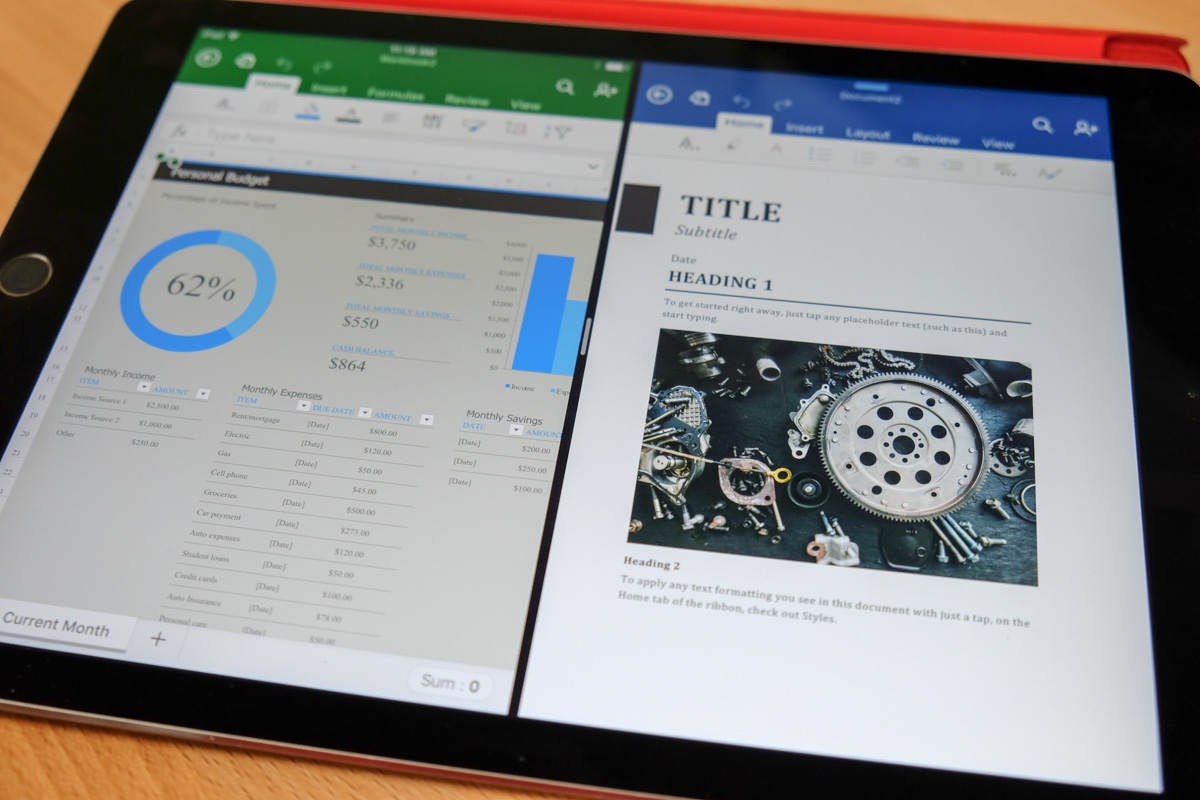
Taking the concept of slide over one-step further is another new feature called Split View. For the first time iPad users will have the ability to run two apps on screen at the same time. Unlike slide over, users can interact with both apps simultaneously, and also adjust the amount of screen real estate each one takes up.

The Split view feature was displayed onstage at Apple’s Sept. 9 event to demonstrate how users can work with both Word and Excel document concurrently, sharing content between the two applications. I used it on numerous occasions to conduct research in Safari while writing a story in the Notes app. I wasn’t forced to bounce between apps; I could gather the necessary facts and incorporate them with ease.

Unfortunately, sharing content between the two apps isn’t easy and has to be done through copy and paste. Adding a drag-and-drop method, where users could add photos to a Word document from another app, or attaching a PowerPoint presentation to an email seems like a natural fit, alleviating unnecessary steps in the process.

Additionally, as more apps are updated and released for iOS 9, in turn, polluting the column of apps you can choose from, the feature will become harder to use. Right now, iOS 9 lacks a method for removing apps or reorganizing the order in which apps are displayed, which is a frustrating omission.

A new powerful picture-in-picture feature makes it possible to continue watching videos or conducting FaceTime video calls. Users can, for example, watch a movie while browsing Facebook or Twitter. The video player is adjustable in size and can be placed in any corner of the screen.

Slide over and picture-in-picture will work on the iPad Pro, both iPad Air models, as well as the iPad Mini 2 and newer devices. Split-view is limited to the iPad Air 2, iPad Mini 4, and the iPad Pro.

Apple also updated the iPad’s virtual keyboard, adding trackpad-like functionality to the device. As you enter text, you can place two fingers on the keyboard in order to activate the new feature. When active, you drag your fingers across the keyboard to move the cursor. A quick double-tap of two fingers on the screen will highlight the nearest word, and continue highlighting until you lift your fingers off the screen.

Editing big blocks of text used to be a laborious process, requiring multiple taps, but the new trackpad functionality simplifies this process. At present, my only complaint is that it’s not available across the company’s entire iPhone lineup; only the iPhone 6s will have it thanks to 3D Touch.

There’s still a lot of work to be done, but overall, the iPad’s new operating system is a step in the right direction. It makes sense for iOS 9 to introduce the new features now, rather than wait for the iPad Pro to become available. Users can put the iPad’s multitasking prowess to the test over the next two months. Armed with knowledge gained from the experience, consumers can then decide if an iPad Pro is worth purchasing.

The iPad is finally growing up—both in size, and feature set. As someone who had already incorporated the iPad, before iOS 9 existed, into my daily work routine, I’m excited to see what the future holds.

Sign up for Data Sheet, Fortune’s daily newsletter about the business of technology.

For more Fortune coverage about Apple iPads, watch the following video:

About the Author
By Jason Cipriani
See full bioRight Arrow Button Icon

Latest in Tech

Finance
Lorem ipsum dolor sit amet, consectetur adipiscing elit, sed do eiusmod tempor incididunt ut labore et dolore magna aliqua. Ut enim ad minim veniam
By Fortune Editors
October 20, 2025
Finance
Lorem ipsum dolor sit amet, consectetur adipiscing elit, sed do eiusmod tempor incididunt ut labore et dolore magna aliqua. Ut enim ad minim veniam
By Fortune Editors
October 20, 2025
Finance
Lorem ipsum dolor sit amet, consectetur adipiscing elit, sed do eiusmod tempor incididunt ut labore et dolore magna aliqua. Ut enim ad minim veniam
By Fortune Editors
October 20, 2025
Finance
Lorem ipsum dolor sit amet, consectetur adipiscing elit, sed do eiusmod tempor incididunt ut labore et dolore magna aliqua. Ut enim ad minim veniam
By Fortune Editors
October 20, 2025
Finance
Lorem ipsum dolor sit amet, consectetur adipiscing elit, sed do eiusmod tempor incididunt ut labore et dolore magna aliqua. Ut enim ad minim veniam
By Fortune Editors
October 20, 2025
Finance
Lorem ipsum dolor sit amet, consectetur adipiscing elit, sed do eiusmod tempor incididunt ut labore et dolore magna aliqua. Ut enim ad minim veniam
By Fortune Editors
October 20, 2025

Most Popular

Finance
Lorem ipsum dolor sit amet, consectetur adipiscing elit, sed do eiusmod tempor incididunt ut labore et dolore magna aliqua. Ut enim ad minim veniam
By Fortune Editors
October 20, 2025
Finance
Lorem ipsum dolor sit amet, consectetur adipiscing elit, sed do eiusmod tempor incididunt ut labore et dolore magna aliqua. Ut enim ad minim veniam
By Fortune Editors
October 20, 2025
Finance
Lorem ipsum dolor sit amet, consectetur adipiscing elit, sed do eiusmod tempor incididunt ut labore et dolore magna aliqua. Ut enim ad minim veniam
By Fortune Editors
October 20, 2025
Finance
Lorem ipsum dolor sit amet, consectetur adipiscing elit, sed do eiusmod tempor incididunt ut labore et dolore magna aliqua. Ut enim ad minim veniam
By Fortune Editors
October 20, 2025
Finance
Lorem ipsum dolor sit amet, consectetur adipiscing elit, sed do eiusmod tempor incididunt ut labore et dolore magna aliqua. Ut enim ad minim veniam
By Fortune Editors
October 20, 2025
Finance
Lorem ipsum dolor sit amet, consectetur adipiscing elit, sed do eiusmod tempor incididunt ut labore et dolore magna aliqua. Ut enim ad minim veniam
By Fortune Editors
October 20, 2025
Fortune Secondary Logo
Rankings
  • 100 Best Companies
  • Fortune 500
  • Global 500
  • Fortune 500 Europe
  • Most Powerful Women
  • Future 50
  • World’s Most Admired Companies
  • See All Rankings
Sections
  • Finance
  • Fortune Crypto
  • Features
  • Leadership
  • Health
  • Commentary
  • Success
  • Retail
  • Mpw
  • Tech
  • Lifestyle
  • CEO Initiative
  • Asia
  • Politics
  • Conferences
  • Europe
  • Newsletters
  • Personal Finance
  • Environment
  • Magazine
  • Education
Customer Support
  • Frequently Asked Questions
  • Customer Service Portal
  • Privacy Policy
  • Terms Of Use
  • Single Issues For Purchase
  • International Print
Commercial Services
  • Advertising
  • Fortune Brand Studio
  • Fortune Analytics
  • Fortune Conferences
  • Business Development
About Us
  • About Us
  • Editorial Calendar
  • Press Center
  • Work At Fortune
  • Diversity And Inclusion
  • Terms And Conditions
  • Site Map
Fortune Secondary Logo
  • About Us
  • Editorial Calendar
  • Press Center
  • Work At Fortune
  • Diversity And Inclusion
  • Terms And Conditions
  • Site Map
  • Facebook icon
  • Twitter icon
  • LinkedIn icon
  • Instagram icon
  • Pinterest icon

Latest in Tech

sam altman
AIOpenAI
Sam Altman tells staff at an all-hands that OpenAI is negotiating a deal with the Pentagon, after Trump orders the end of Anthropic contracts
By Sharon GoldmanFebruary 27, 2026
8 hours ago
Future of Workthe future of work
Have good taste? It may just get you a job during the AI jobs apocalypse, says Sam Altman
By Marco Quiroz-GutierrezFebruary 27, 2026
8 hours ago
CybersecurityMeta
Trump’s FTC backs off social media regulation despite finding that nearly 20% of America’s children are online for 4 hours or more
By Catherina GioinoFebruary 27, 2026
9 hours ago
Emil Michael smirks
AIAnthropic
Emil Michael, the Silicon Valley exec turned Trump official leading the war against Anthropic, has deep ties to the tech world
By Lily Mae LazarusFebruary 27, 2026
9 hours ago
AIMilitary
Trump orders U.S. government to stop using Anthropic but gives Pentagon six months to phase it out while Hegseth adds supply-chain risk designation
By Jason MaFebruary 27, 2026
10 hours ago
Arts & EntertainmentHollywood
The battle over WBD left three big winners on Wall Street—while the thousands who lost out will remain behind the scenes
By Geoff ColvinFebruary 27, 2026
10 hours ago

Most Popular

placeholder alt text
Innovation
An MIT roboticist who cofounded bankrupt robot vacuum maker iRobot says Elon Musk’s vision of humanoid robot assistants is ‘pure fantasy thinking’
By Marco Quiroz-GutierrezFebruary 25, 2026
2 days ago
placeholder alt text
Commentary
'The Pitt': a masterclass display of DEI in action 
By Robert RabenFebruary 26, 2026
2 days ago
placeholder alt text
Success
Japanese companies are paying older workers to sit by a window and do nothing—while Western CEOs demand super-AI productivity just to keep your job
By Orianna Rosa RoyleFebruary 27, 2026
16 hours ago
placeholder alt text
Economy
It’s more than George Clooney moving to France: America is becoming the ‘uncool’ country that people want to move away from
By Nick LichtenbergFebruary 27, 2026
23 hours ago
placeholder alt text
Success
Jeff Bezos says being lazy, not working hard, is the root of anxiety: ‘The stress goes away the second I take that first step’
By Sydney LakeFebruary 25, 2026
3 days ago
placeholder alt text
Success
Gen Z Olympic champion Eileen Gu says she rewires her brain daily to be more successful—and multimillionaire founder Arianna Huffington says it really does work
By Orianna Rosa RoyleFebruary 25, 2026
3 days ago

© 2026 Fortune Media IP Limited. All Rights Reserved. Use of this site constitutes acceptance of our Terms of Use and Privacy Policy | CA Notice at Collection and Privacy Notice | Do Not Sell/Share My Personal Information
FORTUNE is a trademark of Fortune Media IP Limited, registered in the U.S. and other countries. FORTUNE may receive compensation for some links to products and services on this website. Offers may be subject to change without notice.