• Home
  • Latest
  • Fortune 500
  • Finance
  • Tech
  • Leadership
  • Lifestyle
  • Rankings
  • Multimedia
Logged In

Clear space on your iPhone or iPad to make room for an update

By
Jason Cipriani
Jason Cipriani
Down Arrow Button Icon
By
Jason Cipriani
Jason Cipriani
Down Arrow Button Icon
January 20, 2015, 11:00 AM ET
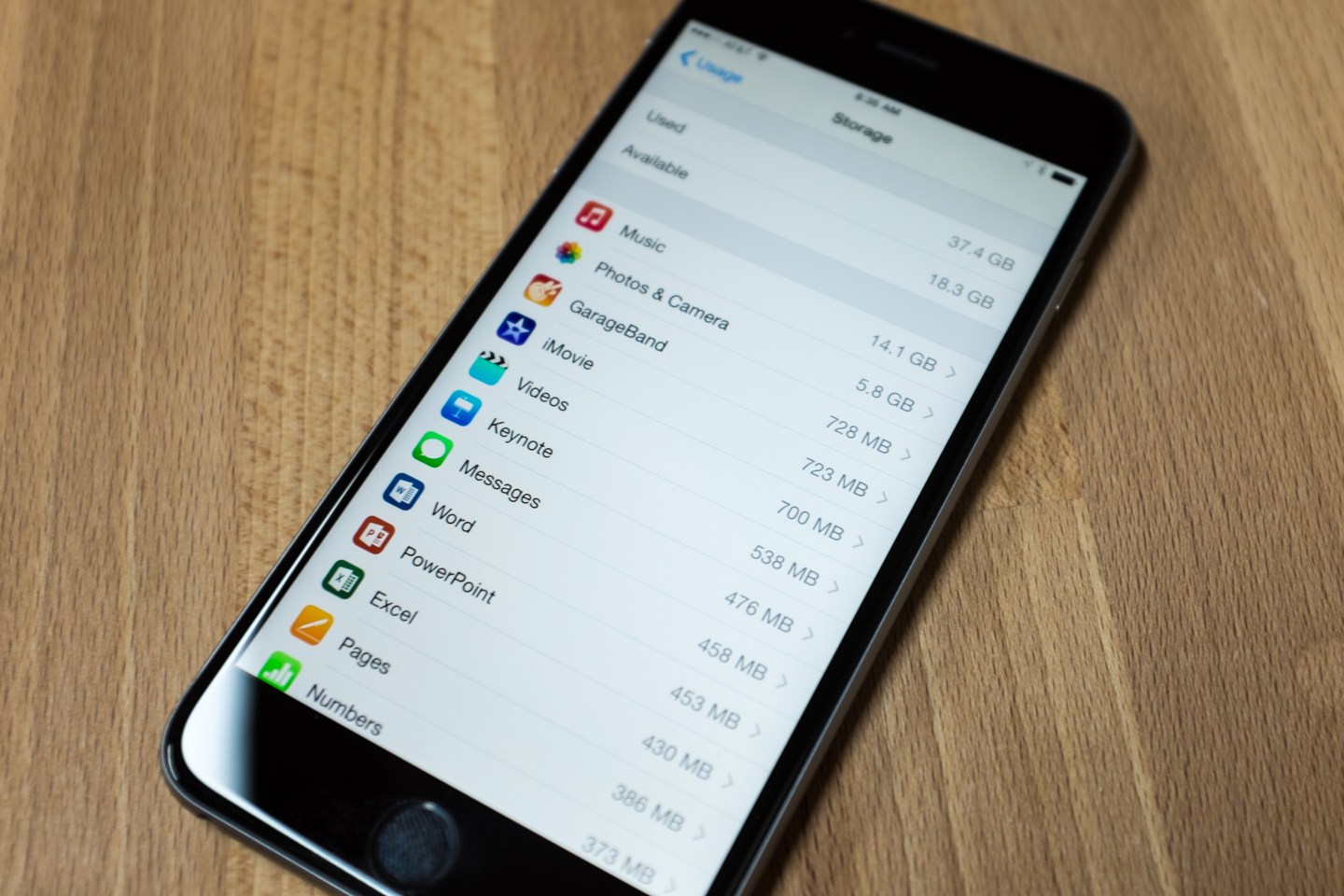
Jason Cipriani's iPhone storage
Jason Cipriani's iPhone storagePhotograph by Jason Cipriani

Q: My iPhone keeps alerting me of an available update, but I can’t update because I’m out of storage. What do I do?

A: Ah, yes. The annoying “This update cannot be installed because it requires at least 4.7 GB of storage” message. Adding to the frustration is the lack of instructions from Apple beyond a brief mention of deleting items from “Usage Settings,” whatever that is. My inbox was flooded with messages asking for help about this issue shortly after the September release of iOS 8.

An annoying issue, sure, but one that’s easy to remedy. I promise you won’t need to be a computer whiz to take care of it on your own.

To start, we need to identify what’s taking up space on your device. This bit of information can be found by follow these steps on your iOS device:

1.) Launch the Settings app. Select “General.”

2.) Find and select “Usage” from the options.

3.) If you’ve updated to iOS 8, you need to take an additional step: select “Manage Storage” in the Usage menu.

Here you’ll find out just how much free space your device has, and more importantly how much you need to clear. Just below the storage statistics at the top, a list of installed apps and associated files will begin to populate. The items taking up the most space will be at the top of the list.

Tap on an app and you’ll be presented with the option to delete it. (One exception: Apple’s core apps, such as Mail or Contacts.) It’s easy to forget just how many apps you have on your device, so take a few extra minutes to perform an audit.

Still need more room?

You probably noticed that the biggest culprit of your dwindling storage is likely the Photos app. It’s hardly a surprise. Apple has been pushing users to trust and depend on its iCloud for backing up the data on their devices. We are connecting our devices to computers far less frequently than we used to. Put those two trends together and we often forget to periodically remove photos and videos—or we assume it’s already being done for us.

Short of deleting your photos outright, the quickest method to clean up your Camera Roll is to sync it with your computer, offloading the photos to a less portable device and clearing space on the one in your pocket. On a Mac, you can use iPhoto or Image Capture. On Windows 7, you should see the AutoPlay prompt asking if you’d like to import your photos. Windows 8 users must launch the Photos app to transfer images.

Once you’ve verified all of your photos (and audio, video, e-books, et cetera) have indeed been offloaded to your computer, delete them from your iOS device.

With enough storage space cleared up, you can go back into Settings > General > Update Software and start the process over.

Lastly, if you’d prefer to clear less space on your iOS device before you update your system software, you can use iTunes to perform the update.

1.) Make sure the computer you’re using is running the latest version of iTunes.

2.) Connect your unlocked iOS device to the computer with a USB cable.

3.) If prompted, select Trust Device on both the computer and mobile device.

4.) Click Download and Update on the prompt alerting you to an available update.

Downloading the update can take anywhere from 10 to 30 minutes depending on the speed of your connection. After it’s downloaded, iTunes will begin the installation. Your device will power off a couple of times, the screen will flash, and a status bar will be show up. Sit back, relax, and wait for it to finish. Your computer will let you know when it’s time to disconnect your device.

Unfortunately, you’re likely to run into this issue all over again as Apple releases more system updates down the road—and as you continue to fill up your device with apps, photos, and the like. If you get the urge to kick the can down the road, don’t: it’s important to keep software current on your iOS device to zap software bugs and patch up security holes. (New features don’t hurt, either.)

With the Apple Watch on the horizon, you can bet your last dollar that Apple will issue a software update to accompany it—so it’s best to bite the bullet now. Wouldn’t it be frustrating to unbox Apple’s latest gadget only to wait an hour while you offload photos from last summer’s trip to the Bahamas?

“Logged In” is Fortune’s personal technology column, written by Jason Cipriani. Read it on Fortune.com each Tuesday.


About the Author
By Jason Cipriani
See full bioRight Arrow Button Icon

Latest in

Finance
Lorem ipsum dolor sit amet, consectetur adipiscing elit, sed do eiusmod tempor incididunt ut labore et dolore magna aliqua. Ut enim ad minim veniam
By Fortune Editors
October 20, 2025
Finance
Lorem ipsum dolor sit amet, consectetur adipiscing elit, sed do eiusmod tempor incididunt ut labore et dolore magna aliqua. Ut enim ad minim veniam
By Fortune Editors
October 20, 2025
Finance
Lorem ipsum dolor sit amet, consectetur adipiscing elit, sed do eiusmod tempor incididunt ut labore et dolore magna aliqua. Ut enim ad minim veniam
By Fortune Editors
October 20, 2025
Finance
Lorem ipsum dolor sit amet, consectetur adipiscing elit, sed do eiusmod tempor incididunt ut labore et dolore magna aliqua. Ut enim ad minim veniam
By Fortune Editors
October 20, 2025
Finance
Lorem ipsum dolor sit amet, consectetur adipiscing elit, sed do eiusmod tempor incididunt ut labore et dolore magna aliqua. Ut enim ad minim veniam
By Fortune Editors
October 20, 2025
Finance
Lorem ipsum dolor sit amet, consectetur adipiscing elit, sed do eiusmod tempor incididunt ut labore et dolore magna aliqua. Ut enim ad minim veniam
By Fortune Editors
October 20, 2025

Most Popular

Finance
Lorem ipsum dolor sit amet, consectetur adipiscing elit, sed do eiusmod tempor incididunt ut labore et dolore magna aliqua. Ut enim ad minim veniam
By Fortune Editors
October 20, 2025
Finance
Lorem ipsum dolor sit amet, consectetur adipiscing elit, sed do eiusmod tempor incididunt ut labore et dolore magna aliqua. Ut enim ad minim veniam
By Fortune Editors
October 20, 2025
Finance
Lorem ipsum dolor sit amet, consectetur adipiscing elit, sed do eiusmod tempor incididunt ut labore et dolore magna aliqua. Ut enim ad minim veniam
By Fortune Editors
October 20, 2025
Finance
Lorem ipsum dolor sit amet, consectetur adipiscing elit, sed do eiusmod tempor incididunt ut labore et dolore magna aliqua. Ut enim ad minim veniam
By Fortune Editors
October 20, 2025
Finance
Lorem ipsum dolor sit amet, consectetur adipiscing elit, sed do eiusmod tempor incididunt ut labore et dolore magna aliqua. Ut enim ad minim veniam
By Fortune Editors
October 20, 2025
Finance
Lorem ipsum dolor sit amet, consectetur adipiscing elit, sed do eiusmod tempor incididunt ut labore et dolore magna aliqua. Ut enim ad minim veniam
By Fortune Editors
October 20, 2025
Rankings
  • 100 Best Companies
  • Fortune 500
  • Global 500
  • Fortune 500 Europe
  • Most Powerful Women
  • Future 50
  • World’s Most Admired Companies
  • See All Rankings
Sections
  • Finance
  • Leadership
  • Success
  • Tech
  • Asia
  • Europe
  • Environment
  • Fortune Crypto
  • Health
  • Retail
  • Lifestyle
  • Politics
  • Newsletters
  • Magazine
  • Features
  • Commentary
  • Mpw
  • CEO Initiative
  • Conferences
  • Personal Finance
  • Education
Customer Support
  • Frequently Asked Questions
  • Customer Service Portal
  • Privacy Policy
  • Terms Of Use
  • Single Issues For Purchase
  • International Print
Commercial Services
  • Advertising
  • Fortune Brand Studio
  • Fortune Analytics
  • Fortune Conferences
  • Business Development
About Us
  • About Us
  • Editorial Calendar
  • Press Center
  • Work At Fortune
  • Diversity And Inclusion
  • Terms And Conditions
  • Site Map
  • Facebook icon
  • Twitter icon
  • LinkedIn icon
  • Instagram icon
  • Pinterest icon

Most Popular

placeholder alt text
North America
'I meant what I said in Davos': Carney says he really is planning a Canada split with the U.S. along with 12 new trade deals
By Rob Gillies and The Associated PressJanuary 28, 2026
3 days ago
placeholder alt text
Politics
The American taxpayer spent nearly half a billion dollars deploying federal troops to U.S. cities in 2025, CBO finds
By Nick LichtenbergJanuary 28, 2026
2 days ago
placeholder alt text
Economy
Right before Trump named Warsh to lead the Fed, Powell seemed to respond to some of his biggest complaints about the central bank
By Jason MaJanuary 30, 2026
15 hours ago
placeholder alt text
C-Suite
Jeff Bezos capped his Amazon salary at $80,000: ‘How could I possibly need more incentive?’
By Sydney LakeJanuary 28, 2026
3 days ago
placeholder alt text
C-Suite
Fortune 500 CEOs are no longer giving employees an A for effort. Now they want proof of impact
By Claire ZillmanJanuary 28, 2026
3 days ago
placeholder alt text
AI
Top engineers at Anthropic, OpenAI say AI now writes 100% of their code—with big implications for the future of software development jobs
By Beatrice NolanJanuary 29, 2026
2 days ago

© 2026 Fortune Media IP Limited. All Rights Reserved. Use of this site constitutes acceptance of our Terms of Use and Privacy Policy | CA Notice at Collection and Privacy Notice | Do Not Sell/Share My Personal Information
FORTUNE is a trademark of Fortune Media IP Limited, registered in the U.S. and other countries. FORTUNE may receive compensation for some links to products and services on this website. Offers may be subject to change without notice.


Latest in

Jerome Powell leaving the Fed is a key concern for Claudia Sahm.
EconomyLabor
‘I just don’t have a good feeling about this’: Top economist Claudia Sahm says the economy quietly shifted and everyone’s now looking at the wrong alarm
By Eleanor PringleJanuary 31, 2026
12 seconds ago
Politicsgovernment shutdown
Federal government heads for weekend shutdown after Trump makes rare deal with Senate Democrats over DHS funding
By Mary Clare Jalonick, Lisa Mascaro and The Associated PressJanuary 30, 2026
7 hours ago
LawDepartment of Justice
Justice Department opens a federal civil rights probe into the killing of Alex Pretti, with FBI leading the investigation
By Michael Biesecker, Rebecca Santana, Alanna Durkin Richer and The Associated PressJanuary 30, 2026
7 hours ago
PoliticsJeffrey Epstein
Latest Epstein files detail contact with Howard Lutnick, Steve Bannon and Goldman Sachs lawyer
By Eric Tucker, Michael R. Sisak, Alanna Durkin Richer and The Associated PressJanuary 30, 2026
7 hours ago
In this handout, the mug shot of Jeffrey Epstein, 2019.
PoliticsJeffrey Epstein
Elon Musk and Jeffrey Epstein emailed each other for years trying to meet up, new Justice Department records show
By Eva Roytburg and Sasha RogelbergJanuary 30, 2026
7 hours ago
United States President Donald Trump
EconomyInflation
Trump’s unlikely promise to ‘end inflation’ still saw families paying an extra $2,120 for goods and services in 2025
By Eleanor PringleJanuary 30, 2026
10 hours ago