

Discover how Adobe Acrobat’s PDF Spaces lets you share interactive, AI-powered experiences that engage, inform, and connect your audience in new ways.
Today in Acrobat, we’re introducing a new way to share information, one designed to engage, inform, and move the people who matter most.
Adobe invented PDF to make sharing information consistent across devices and platforms. PDF has become the global standard for sharing important information across devices and platforms, with trillions of files in circulation, from contracts and research papers to top-secret UFO files and everything in between.
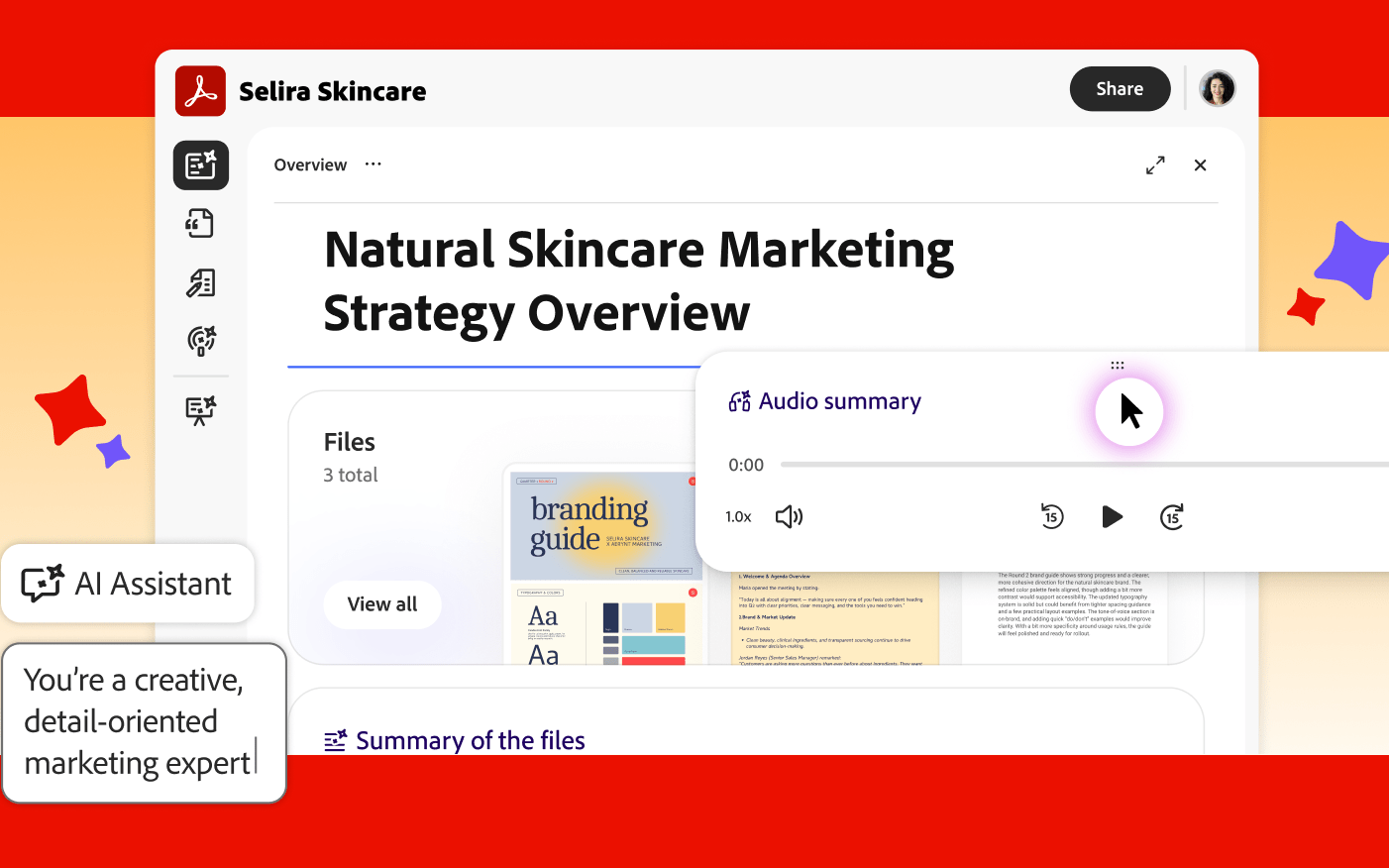
With PDF Spaces in Acrobat, we introduced an AI-powered workspace where you can bring together PDFs, documents, links, and notes to do research, get trusted insights, and create content with Adobe Express. With the new capabilities in PDF Spaces, we’re not just adding new features—we’re introducing a new way to share information. For the first time, sending documents can mean sharing an experience that’s tailored to your intended audience, whether that’s a client, a team, or a million subscribers.
New way to share with PDF Spaces
Adobe’s new productivity agent makes this possible, working for you to generate summaries, answer questions, provide guidance, and tell you who’s engaging. Here’s how it works:
- Create a tailored space. How you present information is just as important as the information itself. Bring in PDFs, documents, links, and notes, and the agent generates the experience, including a dedicated space with a fully editable overview. Add context or directions to set the tone or change the order to showcase the most important information. When you update your docs, the information in the experience you share updates, too, so everyone always has the freshest view.
- Get people up to speed fast with an audio overview. The agent automatically generates an audio summary to help orient recipients before they dive in. Edit the script so the right message comes through every time.
- Customize an AI Assistant to fit the moment: Every PDF Space comes with an AI Assistant. You can customize it for sending by telling it about your goals, your audience, and your tone to help shape its personality. When you share the information, the assistant comes along to answer questions and provide recommendations, so it feels more like an interactive experience than a collection of documents for the people on the other side. Let’s say you have a white paper about AI. If you’re sharing with a group of middle school students, you could customize the assistant to help decode complicated terms. Sharing with engineers? You could customize the assistant to help them apply the information to their job. (PS: You don’t have to be a prompting expert to get it right—the AI Assistant will guide you through the process!)
- Add your brand: Include your logo and color palette to create a professional, on-brand experience.
- Follow up with confidence. That agent provides engagement insights to help make follow-up timely, targeted, and informed.
From the boardroom to your bridal party
Whether you’re closing a deal or planning a reunion, here are some ways you can put these capabilities to work, no matter what you’re trying to accomplish:
- Sales teams can combine proposals, product overviews, and case studies into a single branded space so everyone on the buying committee gets a compelling story instead of a scattered file drop. And you can see who’s engaged and know how to follow up.
- Marketers can turn research, reports, and launch announcements into guided, interactive experiences that move audiences from passive reading to genuine engagement.
- HR and compliance leaders can share onboarding packages and policy updates as guided experiences, so recipients get the full context, not just an attachment they’ll skim and forget. Engagement data helps you know which employees have engaged.
- Executives and finance teams can share board pre-reads, investor briefings, and operating plans as cohesive narratives so stakeholders arrive aligned and ready to have the right discussions and make informed decisions.
- Content publishers and creators can package articles, research, and insights into interactive spaces that deepen audience engagement, reinforce credibility, and give readers something worth coming back for. See how Vice Media, Kid Cudi, Jessica Yellin, and Mindy Weiss are using PDF Spaces to engage their audiences in new ways.
- Sharing in your personal life:The need to be clearly understood doesn’t clock out at the end of the day. Planning a wedding or reunion? Share one experience where friends and family can explore every detail at their own pace. Want to help someone understand a complex topic—AI, taxes, investing? Turn it into a guided experience with an AI Assistant that handles follow-up questions on your behalf. Even personal updates get an upgrade. Instead of a newsletter few people read, share highlights as something people can explore on their own terms.
Evolving AI to work for you
Whatever the moment, PDF Spaces gives everyone a new way to share what matters and make sure it lands. And with the Acrobat productivity agent constantly evolving and working for you behind the scenes, the impact you have and the understanding you inspire can get stronger every day.
Read more here. Get started today.
Note: This content was created by Adobe.