• Home
  • Latest
  • Fortune 500
  • Finance
  • Tech
  • Leadership
  • Lifestyle
  • Rankings
  • Multimedia

New

Watch Fortune Daily, our new video show that brings you inside the Fortune newsroom and the boardroom

Watch Fortune Daily, our new video show that brings you inside the Fortune newsroom and the boardroom

Watch Fortune Daily, our new video show that brings you inside the Fortune newsroom and the boardroom

Watch Fortune Daily, our new video show that brings you inside the Fortune newsroom and the boardroom

Watch Fortune Daily, our new video show that brings you inside the Fortune newsroom and the boardroom

Watch Fortune Daily, our new video show that brings you inside the Fortune newsroom and the boardroom

Watch Fortune Daily, our new video show that brings you inside the Fortune newsroom and the boardroom

Watch Fortune Daily, our new video show that brings you inside the Fortune newsroom and the boardroom

Watch Fortune Daily, our new video show that brings you inside the Fortune newsroom and the boardroom

Watch Fortune Daily, our new video show that brings you inside the Fortune newsroom and the boardroom

Logged In

How to print from your smartphone or tablet

By
Jason Cipriani
Jason Cipriani
Down Arrow Button Icon
By
Jason Cipriani
Jason Cipriani
Down Arrow Button Icon
January 27, 2015, 12:16 PM ET
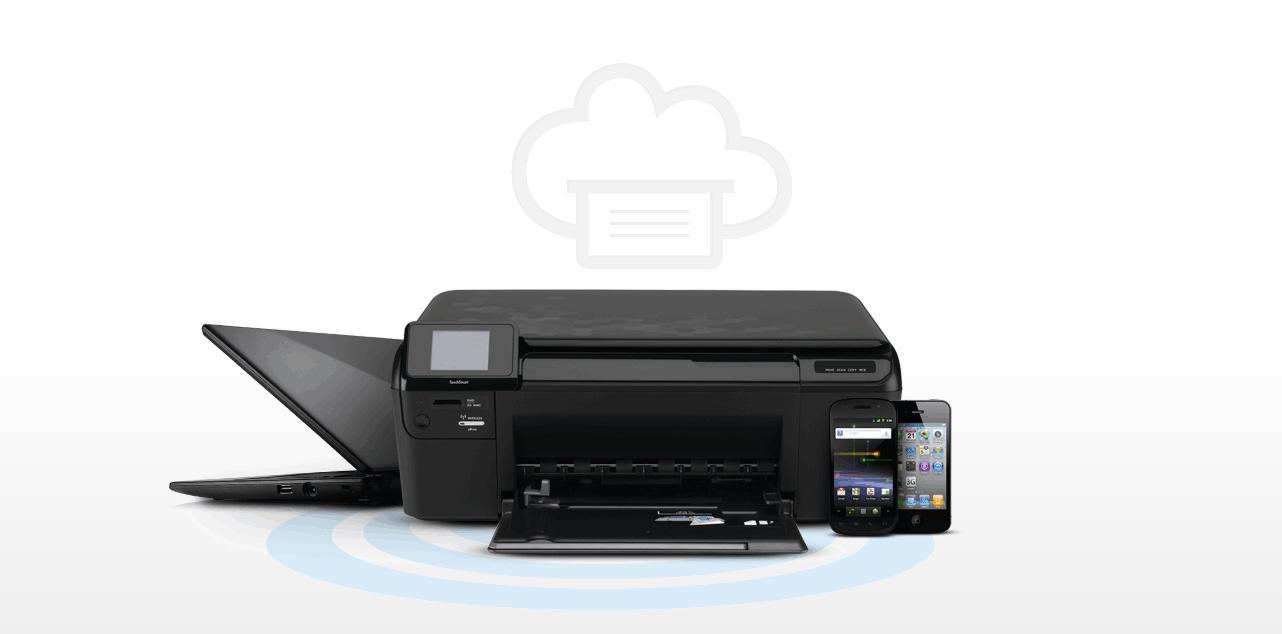
Google Cloud Print photo illustration
Google Cloud Print photo illustrationCourtesy: Google
Add Fortune on Google for similar content.

Q. I was told I can print from my iPad, but I can’t figure out how to do it. Help!

A. With the ever-growing ability to get more work done using our mobile devices, it’s only a matter of time before you find yourself searching for the print button. Google’s Android and Apple’s iOS offer the ability to print a boarding pass or (shudder) spreadsheet without forcing you to open a laptop. Below, I outline how to print from devices that use either mobile operating system.

Printing from an iOS device—whether it’s an iPhone, iPad, or even iPod touch—is possible with AirPrint. The service requires your device to be connected to the same Wi-Fi network as an AirPrint-compatible printer. You can find a list of supported printers on Apple’s support site.

If you own or have access to a supported printer, you’re in luck. With both devices are connected to the same network, you can print items from within various apps on your iOS device by tapping on the action button, the name for the icon depicting a rectangle (like a screen) with an arrow pointing up, where available. Select it and next appears a “Share Sheet” with two rows of icons. You can find the print icon in the bottom row. Tap on it, select your printer, and set the number of copies to be printed. Done.

There isn’t a dedicated printing app within iOS; instead, you begin the process within an app. Should something go awry, you can check on the status of a print job by double-pressing the home button and swiping once to the right. A Print Summary window will appear; selecting it will provide more information regarding any open print jobs.

And what if you don’t have an AirPrint-compatible printer? All is not lost. If you have a Wi-Fi-enabled printer that doesn’t support AirPrint, it’s likely that the manufacturer has its own app in Apple’s App Store that makes wireless printing possible. HP has its ePrint app, Epson has its iPrint app, Canon has its Mobile Print app, and so on. Search the App Store for your manufacturer’s name and you should be able to find a corresponding app. Don’t have a Wi-Fi enabled printer at all? HandyPrint (for Mac users) and Presto (for Windows users) offer workarounds to force your iOS devices to find your printer via AirPrint.

Users of Google Android devices can take advantage of Google’s Cloud Print service. If you purchased your Android device in the last year or so, Cloud Print should come pre-installed on your device. (You can check by launching the Settings app and scrolling to the bottom of the list where a “Printing” option should be listed.) If it’s not, you can install the Cloud Print app from the Play Store for free.

Cloud Print will automatically scan your Wi-Fi network for compatible printers and install the necessary plug-in in the background. In my case, I set up a new Android device and the HP Printer plugin was automatically added to the Printing section in the Settings app.

The process for printing from an Android device varies based on the app you’re using. Google’s own Docs app requires you to select “Share & Export,” followed by “Print.” Other apps list “Print” in the main menu. My best advice: Start looking for the print command in the menu. If it’s not there, it’s likely under the Share option. When the process has started, a notification will appear in your Notification Shade as a shortcut to check the status of open jobs.

If you’re an Android user without a Wi-Fi-enabled printer, don’t use a third-party solution right off the bat. Instead, follow the instructions on Google’s Cloud Print support site. The process is simple, but does require you to have Google’s Chrome browser installed and the printer connected to a computer that’s always on.

Finally: This is the second “Logged In” column where I’ve answered a burning personal technology question. (You can read the first one here.) If you’re struggling with a tech-related issue that you’d like to see answered in a future column, email me at jason@jasoncipriani.com.

“Logged In” is Fortune’s personal technology column, written by Jason Cipriani. Read it on Fortune.com each Tuesday.

About the Author
By Jason Cipriani
See full bioRight Arrow Button Icon
Add Fortune on Google for similar content.

Latest in

Finance
Lorem ipsum dolor sit amet, consectetur adipiscing elit, sed do eiusmod tempor incididunt ut labore et dolore magna aliqua. Ut enim ad minim veniam
By Fortune Editors
October 20, 2025
Finance
Lorem ipsum dolor sit amet, consectetur adipiscing elit, sed do eiusmod tempor incididunt ut labore et dolore magna aliqua. Ut enim ad minim veniam
By Fortune Editors
October 20, 2025
Finance
Lorem ipsum dolor sit amet, consectetur adipiscing elit, sed do eiusmod tempor incididunt ut labore et dolore magna aliqua. Ut enim ad minim veniam
By Fortune Editors
October 20, 2025
Finance
Lorem ipsum dolor sit amet, consectetur adipiscing elit, sed do eiusmod tempor incididunt ut labore et dolore magna aliqua. Ut enim ad minim veniam
By Fortune Editors
October 20, 2025
Finance
Lorem ipsum dolor sit amet, consectetur adipiscing elit, sed do eiusmod tempor incididunt ut labore et dolore magna aliqua. Ut enim ad minim veniam
By Fortune Editors
October 20, 2025
Finance
Lorem ipsum dolor sit amet, consectetur adipiscing elit, sed do eiusmod tempor incididunt ut labore et dolore magna aliqua. Ut enim ad minim veniam
By Fortune Editors
October 20, 2025

Most Popular

Finance
Lorem ipsum dolor sit amet, consectetur adipiscing elit, sed do eiusmod tempor incididunt ut labore et dolore magna aliqua. Ut enim ad minim veniam
By Fortune Editors
October 20, 2025
Finance
Lorem ipsum dolor sit amet, consectetur adipiscing elit, sed do eiusmod tempor incididunt ut labore et dolore magna aliqua. Ut enim ad minim veniam
By Fortune Editors
October 20, 2025
Finance
Lorem ipsum dolor sit amet, consectetur adipiscing elit, sed do eiusmod tempor incididunt ut labore et dolore magna aliqua. Ut enim ad minim veniam
By Fortune Editors
October 20, 2025
Finance
Lorem ipsum dolor sit amet, consectetur adipiscing elit, sed do eiusmod tempor incididunt ut labore et dolore magna aliqua. Ut enim ad minim veniam
By Fortune Editors
October 20, 2025
Finance
Lorem ipsum dolor sit amet, consectetur adipiscing elit, sed do eiusmod tempor incididunt ut labore et dolore magna aliqua. Ut enim ad minim veniam
By Fortune Editors
October 20, 2025
Finance
Lorem ipsum dolor sit amet, consectetur adipiscing elit, sed do eiusmod tempor incididunt ut labore et dolore magna aliqua. Ut enim ad minim veniam
By Fortune Editors
October 20, 2025
Fortune Secondary Logo
Rankings
  • 100 Best Companies
  • Fortune 500
  • Global 500
  • Fortune 500 Europe
  • Most Powerful Women
  • World's Most Admired Companies
  • See All Rankings
  • Lists Calendar
Sections
  • Finance
  • Fortune Crypto
  • Features
  • Leadership
  • Health
  • Commentary
  • Success
  • Retail
  • Mpw
  • Tech
  • Lifestyle
  • CEO Initiative
  • Asia
  • Politics
  • Conferences
  • Europe
  • Newsletters
  • Personal Finance
  • Environment
  • Magazine
  • Education
Customer Support
  • Frequently Asked Questions
  • Customer Service Portal
  • Privacy Policy
  • Terms Of Use
  • Single Issues For Purchase
  • International Print
Commercial Services
  • Advertising
  • Fortune Brand Studio
  • Fortune Analytics
  • Fortune Conferences
  • Business Development
  • Group Subscriptions
About Us
  • About Us
  • Press Center
  • Work At Fortune
  • Terms And Conditions
  • Site Map
  • About Us
  • Press Center
  • Work At Fortune
  • Terms And Conditions
  • Site Map
  • Facebook icon
  • Twitter icon
  • LinkedIn icon
  • Instagram icon
  • TikTok icon
  • YouTube icon

Latest in

st. louis
CommentaryData centers
$25 billion in data centers shows St. Louis is serious about competing in the AI economy 
By Ron KitchensAugust 5, 2026
2 hours ago
Photo: the Strait of Hormuz.
NewslettersMarkets
A deal with Iran on the Strait of Hormuz—with a truckload of caveats—could come as soon as today
By Jim EdwardsAugust 5, 2026
3 hours ago
Top CD rates today, Aug. 5, 2026: Lock in up to up to 4.50%
Personal FinanceCertificates of Deposit (CDs)
Top CD rates today, Aug. 5, 2026: Lock in up to up to 4.50%
By Glen Luke FlanaganAugust 5, 2026
3 hours ago
Today’s top high-yield savings rates: Up to 4.50% on Aug. 5, 2026
Personal FinanceSavings accounts
Today’s top high-yield savings rates: Up to 4.50% on Aug. 5, 2026
By Glen Luke FlanaganAugust 5, 2026
3 hours ago
Top CD rates from major banks Aug. 5, 2026: Chase CDs, Bank of America CDs, Citibank CDs, and more
Personal FinanceCertificates of Deposit (CDs)
Top CD rates from major banks on August 5, 2026: Chase CDs, Bank of America CDs, Citibank CDs, and more
By Joseph HostetlerAugust 5, 2026
3 hours ago
Current price of Ethereum for Aug. 6, 2026
Personal FinanceEthereum
Current price of Ethereum for August 5, 2026
By Joseph HostetlerAugust 5, 2026
3 hours ago

Most Popular

How Zohran Mamdani's pied-à-terre tax exposed an epidemic of 'ghost cars' instead
Personal Finance
How Zohran Mamdani's pied-à-terre tax exposed an epidemic of 'ghost cars' instead
By Catherina GioinoAugust 4, 2026
1 day ago
Bars, bowling alleys, and movie theaters cost too much to run and visit. Americans have run out of places to hang out and we're paying with our health
North America
Bars, bowling alleys, and movie theaters cost too much to run and visit. Americans have run out of places to hang out and we're paying with our health
By Catherina GioinoAugust 2, 2026
3 days ago
Forget Gen Z: People in their 70s and 80s are some of the earliest Americans to welcome physical AI into their homes and daily routines
AI
Forget Gen Z: People in their 70s and 80s are some of the earliest Americans to welcome physical AI into their homes and daily routines
By Marco Quiroz-GutierrezAugust 3, 2026
2 days ago
Current price of oil as of August 4, 2026
Personal Finance
Current price of oil as of August 4, 2026
By Joseph HostetlerAugust 4, 2026
1 day ago
Scott Bessent is using moves from his hedge fund days to prop up Japan's yen—and America's $40 trillion national debt
Economy
Scott Bessent is using moves from his hedge fund days to prop up Japan's yen—and America's $40 trillion national debt
By Mia OsmonbekovAugust 4, 2026
18 hours ago
Ray Dalio on the AI bubble nearing 1929, 2000 levels and the lesson people always forget: 'Wealth is not the same as money'
Investing
Ray Dalio on the AI bubble nearing 1929, 2000 levels and the lesson people always forget: 'Wealth is not the same as money'
By Nick LichtenbergAugust 4, 2026
1 day ago

© 2026 Fortune Media IP Limited. All Rights Reserved. Use of this site constitutes acceptance of our Terms of Use and Privacy Policy | CA Notice at Collection and Privacy Notice | Do Not Sell/Share My Personal Information
FORTUNE is a trademark of Fortune Media IP Limited, registered in the U.S. and other countries. FORTUNE may receive compensation for some links to products and services on this website. Offers may be subject to change without notice.